

Call centre analytics software has become essential for modern customer support and sales teams. As call volumes grow and customer expectations rise, businesses need deeper visibility into every interaction. This blog explores the six best call centre analytics software in 2026, highlighting how these tools analyse calls, track agent performance, and improve customer experience. It compares leading platforms to help teams choose the right call centre analytics tools based on features, use cases, and pricing.
What is a Call Centre Analytics Software?
Call centre analytics software collects and analyses data from customer interactions such as calls, chats, and emails to improve agent performance, customer experience, and operational efficiency. It uses AI-driven analytics to uncover trends, flag issues, and support better decisions.
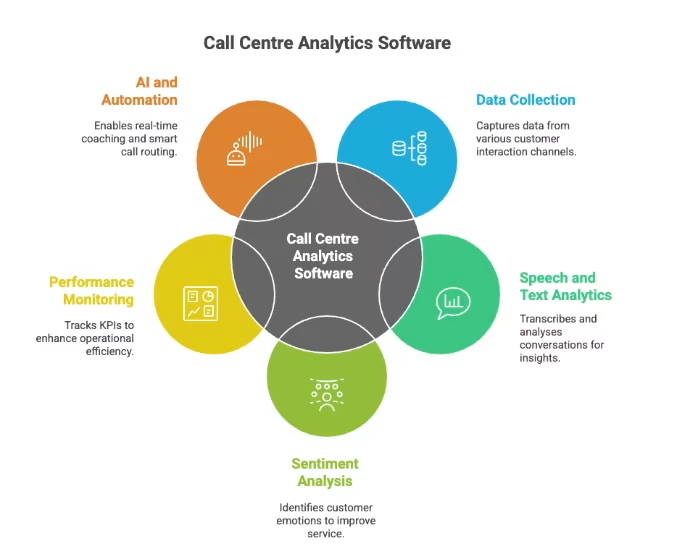
These call centre analytics tools apply speech and text analysis, sentiment detection, and performance dashboards to turn interaction data into actionable intelligence.
Key functions include:
- Data collection: Captures data from voice calls, chat, email, and social channels
- Speech and text analytics: Transcribes conversations and analyses keywords, tone, and emotion
- Sentiment analysis: Identifies customer emotions like frustration or satisfaction
- Performance monitoring: Tracks KPIs such as call handling time and resolution rates
- AI and automation: Enables real-time coaching, automated summaries, and smart call routing
Types of Call Centre Analytics
Call centre analytics tools generally fall into a few categories, and most platforms combine more than one.
- Speech Analytics: Analyses voice interactions for transcripts, tone, pacing, and emotion patterns across calls.
- Text Analytics: Analyses written communication across chat, email, and support tickets for language patterns and sentiment.
- Predictive Analytics: Uses historical data patterns to forecast call volume, agent behaviour, and resolution outcomes.
- Interaction Analytics: Analyses conversation flow within a single call, identifying topic shifts and resolution triggers.
- Cross-Channel Analytics: Analyses customer journeys across voice, chat, and email to identify where handoffs break down.
How We Evaluated These Tools
Each platform on this list was assessed against the same criteria, so the comparison reflects what actually separates these tools rather than a simple feature list.
- Depth of analytics: Whether the tool goes beyond dashboards into speech, sentiment, and predictive analysis.
- Data integration: How well the tool connects with CRM, telephony, and existing contact centre systems.
- Real-time capability: Whether insights are available during a call or only after it ends.
- Pricing transparency: Whether a public starting price exists or a custom quote is required.
- Ease of adoption: How much onboarding is required before teams see value.
The 8 Best Call Centre Analytics Software
Here are eight of the best call centre analytics software options, each offering different features to help improve call performance and customer service.
1. Runo
Runo is a unified call analytics and call management platform built for real-time agent tracking, performance improvement, and data-driven coaching. It helps managers monitor live calls, analyse conversations using AI, and improve outcomes across both SIM-based calling and cloud telephony, without relying on manual reports.
Runo captures every inbound and outbound interaction, securely records calls, and turns conversations into actionable insights through AI summaries, sentiment analysis, and performance dashboards.
Key Features
- Real-time call monitoring and agent tracking
- Automatic call recording for all inbound and outbound calls
- AI call summaries with action items and MOMs
- AI sentiment analysis to detect frustrated customers
- CRM integration with interaction timelines and dashboards
Pros
- Full visibility into live calls and agent performance
- AI-powered QA reduces manual review time
- Faster agent coaching using recordings and analytics
Cons
- Focused mainly on call-centric workflows
- Advanced analytics depend on consistent call usage
- Requires onboarding for full feature adoption
Pricing
- Quarterly plan: ₹899 per user/month
- Half-yearly plan: ₹699 per user/month (22% off)
- Yearly plan: ₹599 per user/month (33% off)
- 10-day free trial available
Rated 4.8/5 on G2, with users citing ease of setup and SIM-based connect rates.
2. Nextiva
Nextiva is a call centre analytics software designed to measure call centre performance at scale. It combines call analytics tools with a cloud PBX to deliver reliable call tracking, high voice quality, and secure communications for growing teams.
Key Features
- Call analytics to track call centre performance
- Cloud PBX with quick feature configuration
- HD Voice supported by high-performance data centres
- Enterprise-grade security with HIPAA and SOC 2 compliance
- 24/7 live customer support
Pros
- Extremely high uptime with proven reliability
- Strong security and compliance standards
- Easy setup for non-technical teams
Cons
- Higher pricing for advanced CX features
- Analytics depth depends on the selected plan
- The feature set may exceed the needs of small teams.
Pricing
- Core: $23 per user/month
- Engage: $50 per user/month
- Power Suite CX: $75 per user/month
Rated 4.5/5 on G2, with users highlighting reliability and customisability.
3. AmplifAI
AmplifAI is a call centre analytics software that unifies contact centre data into an AI-ready platform. It connects analytics with workflows to enable real-time coaching, automated quality assurance, and performance management across roles.
Key Features
- Data unification across CRM, voice, chat, surveys, and IVR systems
- AI-powered speech analytics with sentiment and compliance detection
- Real-time performance management with role-based dashboards
- Automated quality assurance with AI scoring and risk monitoring
- AI-driven coaching workflows for targeted agent development
Pros
- Strong data unification across multiple contact centre systems
- Automated QA reduces manual evaluation effort
- Coaching workflows directly linked to analytics insights
Cons
- Advanced features may require structured onboarding
- Best suited for mid to large contact centre environments
- Relies heavily on data quality from integrated systems
Pricing
- Custom pricing based on deployment and scale
Rated 4.5/5 on G2, with global leader in AI-powered conversation intelligence and customer experience (CX) automation.
4. CallMiner
CallMiner is a call centre analytics software that analyses customer conversations across voice and digital channels. It captures 100% of interactions and converts unstructured conversations into structured data to improve agent performance, customer experience, and business decisions.
Key Features
- Conversation analytics across calls, chat, email, surveys, and social
- Full interaction capture instead of limited call sampling
- Speech and acoustic analysis for emotion, stress, and agitation
- Interaction scoring and performance scorecards
- Real-time analytics with next-best-action guidance
Pros
- Analyses all customer interactions, not partial samples
- Deep insight into customer intent and agent behaviour
- Supports real-time intervention for at-risk customers
Cons
- Designed primarily for large contact centres
- Implementation may require process alignment
- Advanced insights depend on high interaction volume
Pricing
- Custom pricing based on usage and deployment
Rated 4.6/5 on G2, with users citing strong AI-driven insights.
5. Observe.AI
Observe.AI is a call centre analytics software focused on reporting and advanced analytics. It combines pre-built dashboards, custom reports, and GenAI-powered search to help teams analyse trends, test assumptions, and drive data-backed actions across CX, sales, and marketing.
Key Features
- Pre-built and fully customizable analytics dashboards
- GenAI-powered search for ad-hoc analysis
- Custom alerts for performance, compliance, and agent metrics
- Automated external report sharing via email
- Drill-down analysis across all customer interaction sources
Pros
- Strong reporting flexibility for executives and teams
- Granular insights through drill-down analytics
- Automated alerts reduce manual monitoring effort
Cons
- Analytics-focused with limited call control features
- Requires configuration to unlock full reporting value
- Best suited for data-driven teams
Pricing
- Pricing not specified publicly
Rated 4.6/5 on G2, with users citing strong AI-driven insights.
6. Dialpad
Dialpad is a call centre analytics software that combines contact centre operations with built-in analytics. It tracks call performance, agent productivity, and customer interactions using real-time AI, dashboards, and business intelligence tools for data-driven decisions.
Key Features
- Unified live dashboard for call and agent performance
- Real-time call transcription and live sentiment analysis
- Advanced talk-time, abandonment, and queue health metrics
- Customizable reports with Dialpad Business Intelligence
- IVR analytics to optimise call routing and menus
Pros
- Real-time AI transcription and sentiment visibility
- Strong reporting and visualisation options
- Built-in compliance controls for regulated industries
Cons
- Advanced analytics depend on higher-tier plans
- BI customisation may require setup time
- Pricing increases with feature depth
Pricing
- Standard: $27 per user/month
- Pro: $35 per user/month
- Enterprise: Custom pricing
Rated 4.4/5 on G2, with AI-native business communications solution
7. Talkdesk
Talkdesk is a call centre analytics software with AI-driven quality management and predictive forecasting built for enterprise contact centres running complex, high-volume operations.
Key Features
- Automated quality scoring and coaching flags without manual review
- Predictive forecasting for staffing and volume planning
- Real-time sentiment tracking across customer interactions
- AI-powered analytics for monitoring agent and contact centre performance
Pros
- Analytics and calling live in one platform, reducing tool sprawl
- Strong global calling coverage for distributed teams
- AI conversation analytics makes calls easier to review and analyse
Cons
- Call quality depends on internet stability
- Some advanced features may require higher-tier plans
- Teams with complex contact centre requirements may need additional integrations
Pricing
- Starts around $85 per user/month; custom pricing for enterprise deployments
Rated 4.4/5 on G2, with users citing strong AI-driven insights
8. CloudTalk
CloudTalk is a call centre analytics software that combines global cloud telephony with native AI conversation analytics, built for teams that want calling and analytics in one platform.
Key Features
- Automated quality scoring and coaching flags without manual review
- Predictive forecasting for staffing and volume planning
- Real-time sentiment tracking across customer interactions
- AI-powered analytics for monitoring agent and contact centre performance
Pros
- Analytics and calling live in one platform, reducing tool sprawl
- Strong global calling coverage for distributed teams
- AI conversation analytics makes calls easier to review and analyse
Cons
- Call quality depends on internet stability
- Some advanced features may require higher-tier plans
- Teams with complex contact centre requirements may need additional integrations
Pricing
- Starts at $25 per user/month, billed annually
Rated 4.4/5 on G2, with users citing ease of use and global coverage
Quick Overview: Best Call Centre Analytics Software
The table below provides a quick comparison of the eight call centre analytics software options covered in this guide, including their primary strengths, ideal use cases, and pricing.
| Software | Best For | Key Strength | Starting Price |
| Runo | Real-time call monitoring | AI call analytics, agent tracking, and coaching | ₹599/user/month |
| Nextiva | Growing contact centres | Call analytics, cloud PBX, and reliable communications | $23/user/month |
| AmplifAI | AI-powered coaching | Automated QA, performance management, and data unification | Custom |
| CallMiner | Enterprise conversation analytics | 100% interaction capture and deep conversation insights | Custom |
| Observe.AI | Reporting and analytics | GenAI search, custom dashboards, and automated alerts | Custom |
| Dialpad | AI-powered contact centres | Live transcription, sentiment analysis, and call analytics | $27/user/month |
| Talkdesk | Enterprise contact centres | Automated QA, predictive forecasting, and sentiment tracking | ~$85/user/month |
| CloudTalk | Global calling teams | AI conversation analytics and international calling | $25/user/month |
How to Choose the Right Call Centre Analytics Software for Your Team
Before selecting a platform, teams should clearly understand the key call centre KPIs to track , ensuring the software supports meaningful performance measurement. Start by defining your team’s goals and priorities for using call centre analytics software. This ensures you select tools that deliver the insights and outcomes your organisation needs.
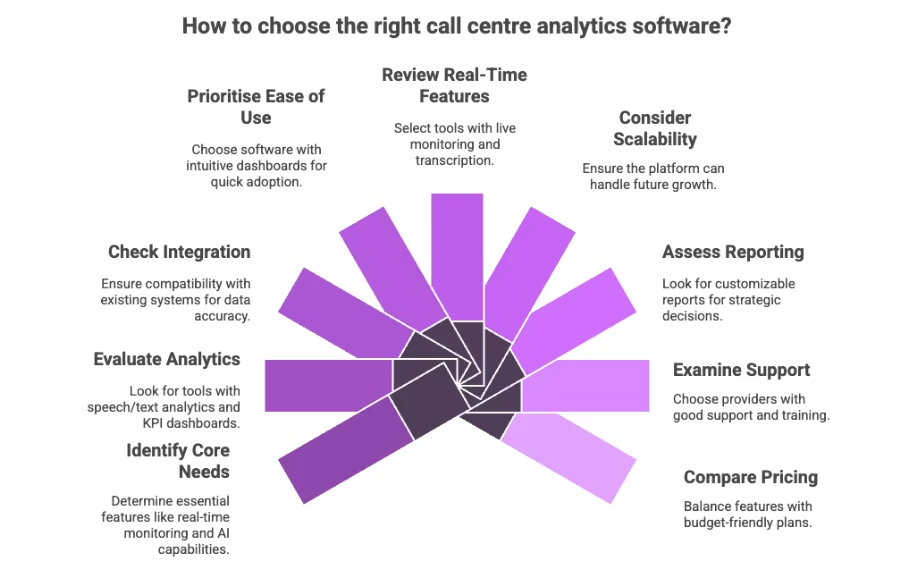
Identify Your Core Needs
- Determine whether you need real-time monitoring, historical reporting, or both.
- Decide whether AI features such as sentiment analysis and automated coaching are essential.
Evaluate Analytics Capabilities
- Look for tools that offer speech/text analytics, KPI dashboards, and trend tracking.
- Choose software that uncovers insights, not just surface-level metrics.
Check Integration with Existing Systems
- Ensure the tool integrates with your CRM, help desk, and communication platforms.
- Integration improves data accuracy and provides a unified view of customer interactions.
Prioritise Ease of Use
- Choose software with intuitive dashboards and a minimal learning curve.
- Complex tools without proper UI may slow adoption.
Review Real-Time Features
- Real-time monitoring and alerts help supervisors intervene quickly.
- Live transcription and sentiment tracking give immediate insight into customer needs.
Consider Scalability
- Select call centre analytics tools that grow with your operations.
- Make sure the platform can handle increased data volume and complexity.
Assess Reporting and Customisation
- Look for customizable reports and visualisations that support multiple teams.
- Advanced reporting enables deeper analysis and better strategic decisions.
Examine Support and Training
- Choose providers offering onboarding support, documentation, and responsive help desks.
- Good support accelerates deployment and resolves issues faster.
Compare Pricing Models
- Consider your budget and total cost of ownership.
- Balance the feature needs with practical plans that fit your team size.
FAQs
What is call centre analytics software used for ?
Call centre analytics software analyses customer interactions to improve agent performance, customer experience, and operational efficiency.
Are call centre analytics tools suitable for small teams?
Yes. Many call centre analytics tools scale easily and work for both small teams and large contact centres.
Do call centre analytics software require AI to be effective?
AI enhances insights such as sentiment and coaching, but even basic analytics deliver value through performance tracking.
Can call centre analytics software integrate with CRM systems?
Most leading call centre analytics software integrates with CRM and support tools to provide a unified view of customer data.
How do I choose the best call centre analytics software?
Evaluate features, integrations, ease of use, scalability, and pricing based on your team’s needs.