

The best CRM for lead management has become a must for businesses that want faster conversions and organised lead follow-ups. Managing leads manually through spreadsheets or different apps slows down the sales process and causes missed opportunities. A CRM built for lead management helps teams capture leads from multiple sources, track every call or message, prioritise high-value prospects, and close deals faster.
But the real struggle many businesses face is the quality and quantity of leads they receive. Many teams end up wasting time on leads that are not the right fit, while high-intent prospects slip through the cracks because of slow follow-ups. According to HubSpot's State of Marketing report, more than half of marketers say their biggest challenge is getting better-quality leads, and a large number report that they do not get enough leads in general.
It leads to low conversions, wasted effort, and slow sales growth. A powerful CRM like Runo solves this by helping teams capture leads from every source in one place, prioritise follow-ups based on intent and activity, and manage communication without delays.
Now, let’s understand why having a strong lead CRM system makes all the difference.
What Is Lead Management?
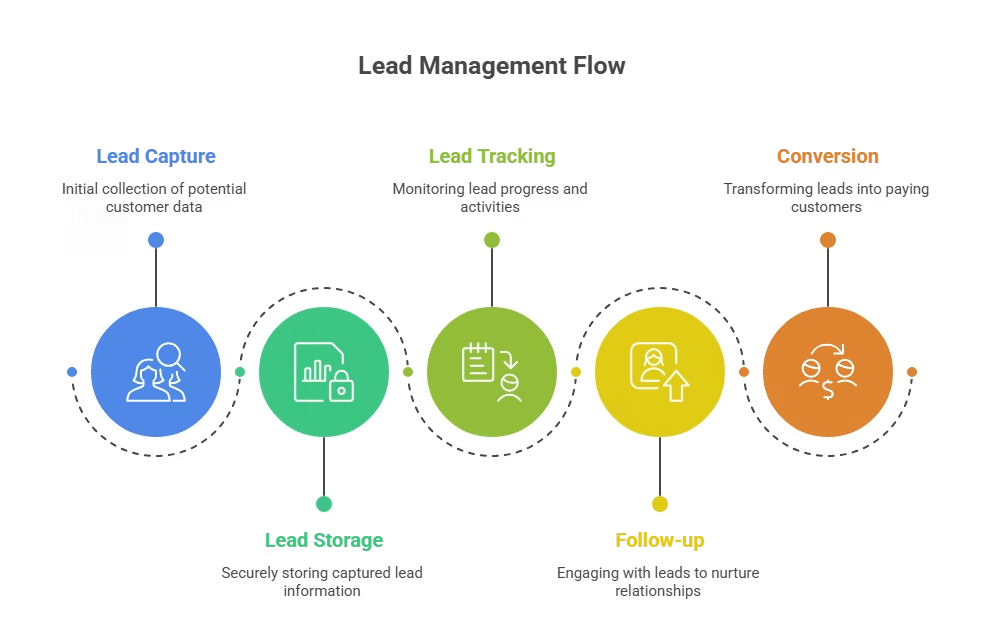
Lead management is the process of capturing, tracking, qualifying, and nurturing potential customers from initial contact through to conversion. It involves organizing lead data, scoring prospects based on engagement and fit, assigning leads to sales reps, and automating follow-ups to ensure no opportunity is lost. Effective lead management shortens sales cycles, improves conversion rates, and maximizes ROI from marketing efforts.
Why You Need a Strong Lead CRM System Today
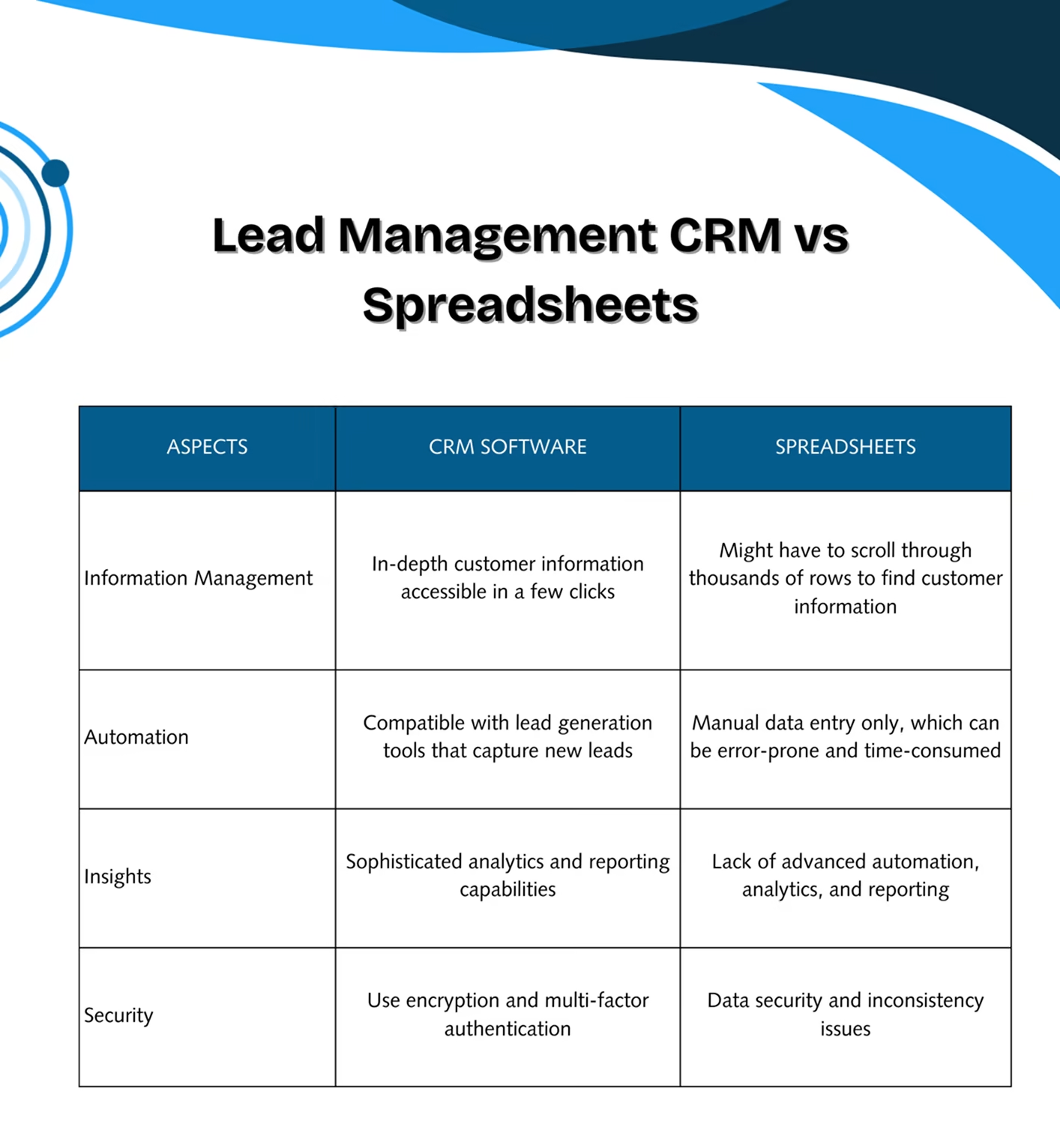
A strong lead CRM system is important because customer expectations are higher than ever. According to Salesforce research, 79% of business buyers expect companies to respond to inquiries within 24 hours, and 40% expect a response within one hour. People want fast replies, clear communication, and smooth follow-ups. If your team still uses spreadsheets or manual tracking, it becomes easy to lose leads, forget callbacks, or send late responses.
A modern CRM:
- Stores all leads in one place.
- Helps you track every call, message, and meeting.
- Scores lead to showing which ones need attention.
- Automates follow-ups.
- Gives reports to measure performance.
Research shows that contacting a lead within 5 minutes makes you 21 times more likely to qualify them compared to waiting 30 minutes. Simple steps like automated lead capture and instant follow-up reminders improve trust, shorten the sales cycle, and help your team close more deals.
Lead Management CRM vs. General CRM: What’s the Difference?
A general CRM manages the entire customer lifecycle from lead to loyal customer including sales, support, and retention. A lead management CRM focuses specifically on the top of the funnel: capturing, scoring, routing, and nurturing prospects before they become customers.
Key differences:
- Lead management CRM: Prioritizes lead capture automation, scoring algorithms, and fast follow-up workflows.
- General CRM: Covers post-sale activities like customer support tickets, renewal tracking, and upsell campaigns.
Most modern CRMs (like HubSpot, Salesforce, and Runo) combine both, but tools like LeadSquared and Freshsales emphasize lead-stage features for high-volume sales teams.
What Is a CRM for Leads?
A CRM for leads is a lead manager software that helps you capture, store, and track leads from different sources. It also gives your team tools to follow up, qualify, and move leads through the pipeline. With a good CRM, you know exactly where each lead stands and what action your team needs to take next.
What Is the Best CRM for Lead Generation?
Many lead generation tools support CRM lead generation , but the best one depends on your business needs. Some CRMs focus on calling, some on automation, and others on analytics. In the list below, you will find CRMs that support small, mid-size, and large teams. We start with Runo, as it offers one of the strongest SIM-based calling systems and smart lead management features for real-time tracking.
Top CRM for Lead Management to Increase Conversions
Below are the top choices you can trust to improve your lead process. Each CRM listed here supports software for lead management , offers smart tools, and helps your team stay on track.
1. Runo.ai: Best Overall CRM for Lead Management
Runo.ai stands out as one of the best CRM for lead management because it focuses on real-time calling, simple workflows, and fast lead capture. It uses SIM-based calling, which means your team can use normal mobile networks instead of internet calls. It improves clarity, trust, and call stability.
Why Runo.ai Leads the Market
Runo is built for businesses that rely heavily on calling. It helps teams handle leads faster and build better customer relationships. With features like instant call logs, click-to-call, and live dashboards, sales teams get more done without switching between multiple apps.
Key Features of Runo.ai
- AI-powered call management
- SIM-based calling for higher trust
- Auto lead allocation
- Complete lead CRM workflows
- Integration with all top lead sources
- Real-time visibility for managers
- 2x calling productivity within two weeks
- Web and mobile access
Best For
- Telecalling teams
- Real estate
- Insurance
- Banking and finance
- Ed-tech
- Automotive sales
Why Choose Runo.ai?
If you want a CRM that helps your team call more customers and convert leads faster, Runo is a strong pick. You can start a 10-day free trial with no credit card needed.
Quick Highlights
Runo was named Global Indian MSME of the Year in Sales Tech. Today, more than 3500 businesses trust it for better lead tracking and fast communication.
2. HubSpot CRM
HubSpot offers a way to manage leads for small and mid-size teams. It provides clean dashboards and strong automation features.
Key Features
- Email tracking
- Lead scoring
- Meeting scheduler
- Marketing automation
- Pipeline management
3. Zoho CRM
Zoho CRM is a popular option for businesses that want custom workflows and a wide range of integrations.
Key Features
- Omnichannel communication
- Lead scoring software
- Reports and analytics
- Social media integration
- Workflow automation
4. Salesforce
Salesforce is one of the most powerful CRMs in the world. It works great for enterprise-level businesses that need high-level automation.
Key Features
- Advanced lead tracking
- Automation at scale
- Custom dashboards
- Strong reporting tools
- Workflow builders
5. Freshsales
Freshsales by Freshworks focuses on providing AI-based lead scoring and simple pipelines.
Key Features
- AI lead scoring
- Built-in communication tools
- Email and SMS tracking
- Pipeline view
- Task reminders
6. Pipedrive
Pipedrive makes it easy to track deals with its drag-and-drop interface.
Key Features
- Visual pipeline
- Email sync
- Call tracking
- Lead scoring
- Automation tools
7. LeadSquared
LeadSquared is built for businesses that handle a high volume of leads every day.
Key Features
- Strong automation
- Lead scoring software
- Mobile CRM
- Sales tracking
- Multi-channel communication
Key Features to Look for in the Best CRM Lead Management Tool
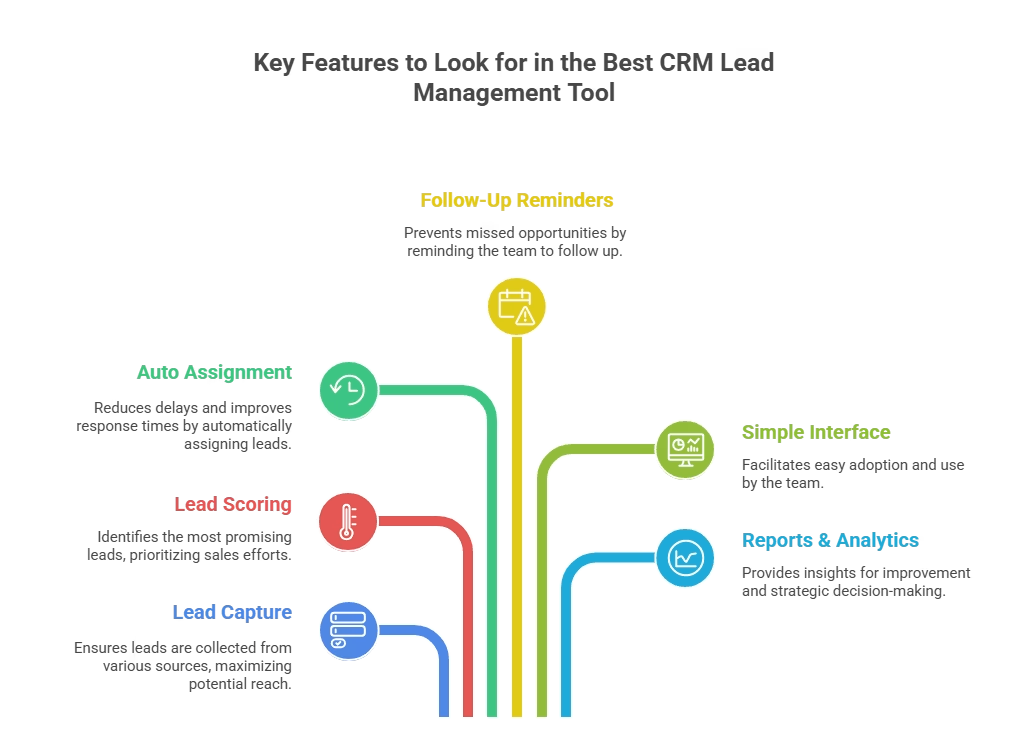
Not all CRMs are the same. Here are the core features you should look for when choosing a lead management tool .
1. Lead Capture from Multiple Sources
Your CRM should collect leads from web forms, ads, social media, WhatsApp, calls, and more.
Key integrations to look for:
- Web forms: WordPress, Typeform, Google Forms
- Paid ads: Facebook Lead Ads, Google Ads, LinkedIn Lead Gen Forms
- Social media: Instagram DMs, Facebook Messenger, WhatsApp Business API
- Automation: Zapier, Make (Integromat), native API
- Calls & SMS: Twilio, RingCentral, SIM-based calling (e.g., Runo)
Centralizing all lead sources in one CRM eliminates data silos and ensures no lead is missed.
2. Lead Scoring
A good lead scoring software helps you identify the hottest leads first by assigning points based on demographics, behavior, and engagement.
How lead scoring works:
- Demographic scoring: Job title (+10), company size (+5), industry match (+15)
- Behavioral scoring: Opened email (+2), clicked link (+5), requested demo (+20), visited pricing page (+10)
- Engagement scoring: Multiple touchpoints in 7 days (+15), replied to outreach (+25)
Leads above a threshold (e.g., 50 points) are marked ‘hot’ and auto-assigned to senior reps for immediate follow-up. This ensures your team focuses on high-intent prospects first.
3. Auto Lead Assignment
It reduces delays and ensures faster response times.
4. Follow-Up Reminders
Reminders help your team avoid missed calls and messages.
5. Simple Interface
Your team should be able to use the CRM without long training sessions.
6. Reports and Analytics
Data helps you understand what is working and where you need improvement.
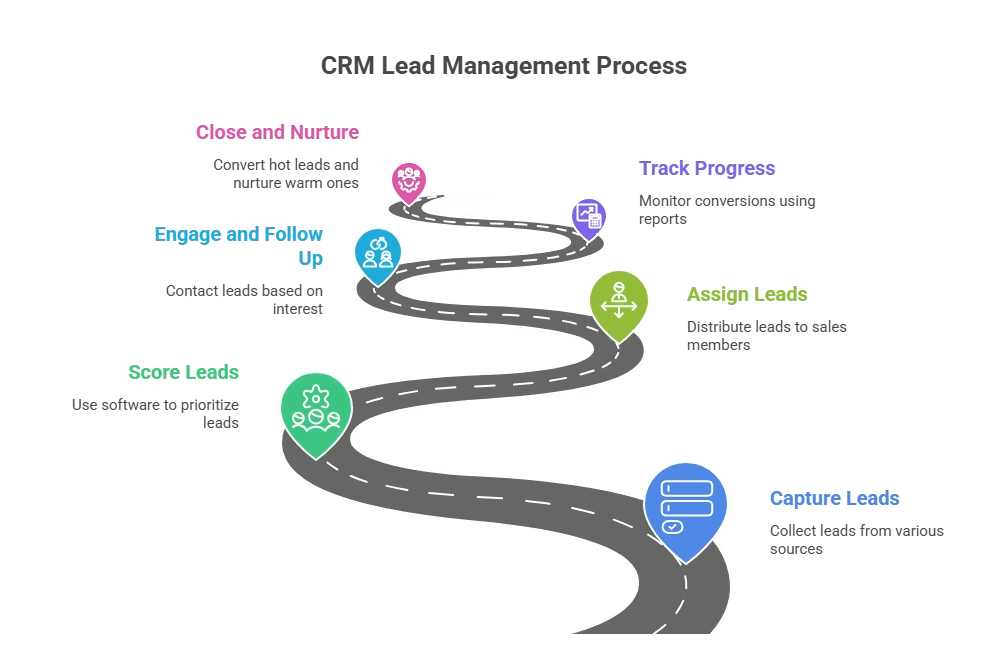
How to Manage Leads in CRM?
If you are wondering how to manage leads in CRM , here are the steps to follow:
Step 1: Capture Leads
Collect leads from ads, forms, chats, calls, and social media.
Step 2: Score Leads
Use lead scoring software to decide which leads need fast follow-up.
Step 3: Assign Leads
Distribute leads to the right sales members.
Step 4: Engage and Follow Up
Call, email, or message leads based on their interest.
Step 5: Track Progress
Use reports to track conversions.
Step 6: Close and Nurture
Convert hot leads and nurture warm ones with regular updates.
Runo.ai: The Best CRM for Lead Management in 2026
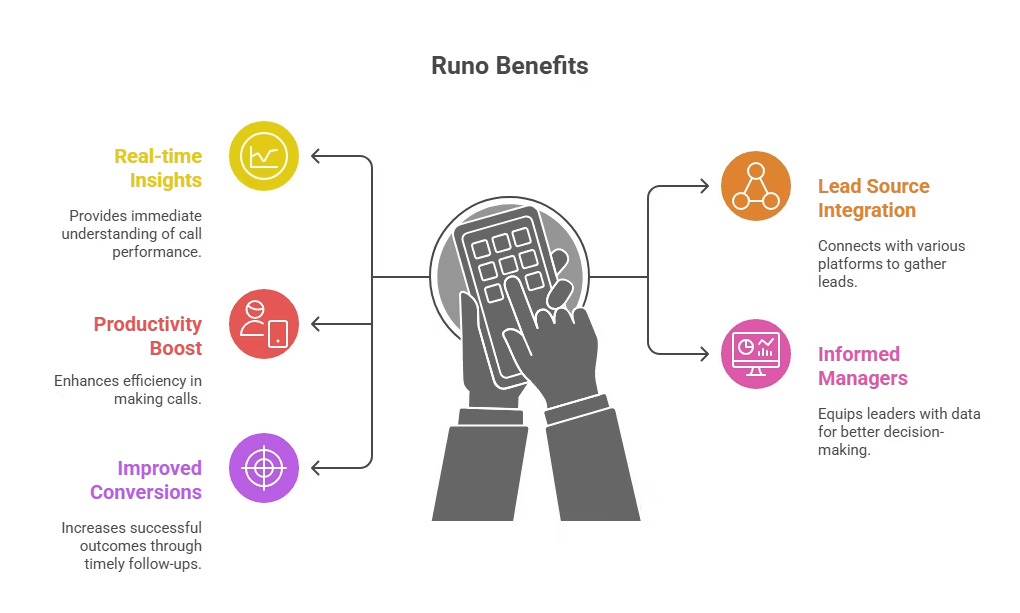
When it comes to managing leads with speed and clarity, Runo stands out as a top choice. With its SIM-based call management system and AI-powered features, it handles everything from calling to tracking.
What Makes Runo Better?
- It gives you real-time call insights.
- It integrates with all lead sources.
- It boosts calling productivity.
- It makes managers more informed.
- It improves conversions with fast follow-ups.
If your team spends most of the day calling leads, Runo is one of the strongest software manage lead options to trust.
CRM Implementation Best Practices
Step 1: Data Migration Planning
Before switching to new lead management software:
- Audit your existing lead data
- Clean duplicate entries
- Standardize data formats
- Plan migration timeline
Step 2: Team Training Strategy
- Start with power users
- Create custom training materials
- Set up practice environments
- Schedule regular check-ins
Step 3: Integration Setup
- Connect email platforms
- Link social media accounts
- Set up website forms
- Configure automation rules
Measuring CRM ROI: Key Metrics to Track
Lead Management Metrics
- Lead response time
- Lead conversion rates
- Cost per lead
- Lead quality scores
- Pipeline velocity
Sales Performance Metrics
- Deal close rates
- Average deal size
- Sales cycle length
- Revenue per rep
- Customer acquisition cost
System Adoption Metrics
- User login frequency
- Feature utilization rates
- Data entry compliance
- Process adherence
Tracking these metrics helps you understand if your top crm lead management software investment is paying off.
The Complete Lead Management Process Flow
Stage 1: Lead Generation
What happens: Prospects discover your business through various channels
Channels: Website forms, social media, paid ads, referrals, cold outreach
CRM role: Automatically captures lead information from all sources
Stage 2: Lead Qualification
What happens: Determine if the lead fits your ideal customer profile
Process: Score leads based on demographics, behavior, and engagement
CRM role: Uses lead scoring algorithms to rank prospects
Stage 3: Lead Distribution
What happens: Assign qualified leads to the right sales representatives
Criteria: Territory, expertise, workload, lead type
CRM role: Automatically routes leads based on predefined rules
Stage 4: Lead Nurturing
What happens: Build relationships through targeted communication
Activities: Email sequences, phone calls, content sharing, demos
CRM role: Tracks all interactions and schedules follow-ups
Stage 5: Conversion
What happens: Convert qualified leads into paying customers
Process: Present proposals, handle objections, close deals
CRM role: Manages pipeline stages and tracks deal progress
Stage 6: Post-Sale Management
What happens: Onboard new customers and identify upsell opportunities
Activities: Customer success, support, retention campaigns
CRM role: Transitions leads to customer management workflows
How to Choose the Right CRM for Your Business Size
Best CRM with Lead Management for Small Business (1-10 employees)
Small businesses need a CRM with lead management for small business teams that's easy to set up, affordable, and doesn't require extensive training. Look for:
- Free or low-cost tiersSimple interface with minimal learning curve
- Basic automation (lead capture, follow-up reminders)
- Email and phone integration
- Mobile access for on-the-go sales reps
For Medium Businesses (10-100 employees)
Medium businesses require more advanced features and better scalability:
- Advanced lead scoring
- Custom workflows
- Team collaboration tools
- Detailed reporting
- Integration capabilities
For Large Enterprises (100+ employees)
Large enterprises need the most robust best crm platforms for lead management:
- Enterprise-grade security
- Advanced customization
- Complex workflow automation
- Comprehensive reporting
- API access
Final Thoughts
Choosing the best CRM for lead management depends on your team size, sales process, and lead volume. But if you want fast calling, real-time tracking, and higher conversions, Runo.ai is a clear winner. Its simple design and strong features make it ideal for growing teams.
Other CRMs like HubSpot, Zoho, and Salesforce also offer great tools for different types of businesses. No matter which one you choose, using the right CRM helps you stay organised, respond faster, and close more deals with ease.
A good CRM does more than store data. It supports your team, guides your workflow, and helps your business grow.
To know more, explore Runo’s expert blog section!
Frequently Asked Questions About the Best CRM for Lead Management
What is the best CRM for lead management in 2026?
The best CRM for lead management depends on your business needs. Runo.ai is best for telecalling teams, HubSpot CRM is ideal for small businesses with its free tier, and Salesforce works best for large enterprises needing advanced customization.
How much does the best lead management software cost?
The best lead management software ranges from free (HubSpot CRM basic) to $25+ per user per month (Salesforce, LeadSquared). Most small businesses can start with options under $20 per user per month.
What features should I look for in the best crm platforms for lead management?
Look for lead capture automation, lead scoring, pipeline management, communication tracking, reporting dashboards, mobile access, and integrations with your existing tools.
Can small businesses use enterprise CRM platforms?
Yes, but it’s often overkill. Small businesses typically benefit more from simpler, cost-effective solutions like HubSpot CRM, Pipedrive, or Runo.ai rather than complex enterprise platforms.
How long does it take to implement a new CRM system?
Implementation typically takes 2-8 weeks depending on complexity. Simple CRMs like Runo.ai can be set up in days, while enterprise solutions like Salesforce may take months.
What’s the difference between CRM and lead management software?
CRM is broader, managing entire customer relationships. Lead management software specifically focuses on capturing, nurturing, and converting prospects into customers. The best CRM platforms include strong lead management features.
What is the best CRM for lead management for small and mid-size businesses?
The best CRM for lead management for small and mid-size teams should offer fast lead capture, calling support, auto assignments, and real-time tracking. Runo.ai fits this need well as it boosts calling productivity and helps teams convert leads faster.
How does the best CRM for lead management increase conversions?
The best CRM for lead management improves conversions by providing quick follow-ups, scoring leads based on interest, and guiding the sales team on which leads to prioritise. It reduces delays and increases the chances of closing deals.
How do I choose the best CRM for lead management for my business?
To choose the best CRM for lead management, check whether it supports lead scoring, auto follow-ups, calling tools, analytics, and integrations with your current lead sources. A simple user interface is also important for fast adoption.