

What Is Cloud Telephony? A Beginner-Friendly Guide
Cloud telephony is changing how businesses handle calls and customer conversations. According to industry research, the global cloud telephony market is expected to grow at a compound annual growth rate (CAGR) of 15-18% through 2027, driven by remote work and digital transformation. But for many, the concept still feels confusing or technical.
In this guide, we break it down simply. You'll learn what cloud telephony means, how it works, its key features, benefits, and common challenges. Whether you're exploring cloud telephony for small businesses or evaluating a cloud based telephony system for enterprise use, this guide covers everything you need to know. We'll also explain how Runo offers an easier alternative for modern call management.
What Is Cloud Telephony?
Let’s start with the basics. What is cloud telephony?
In simple terms, cloud telephony means making and receiving phone calls over the internet rather than traditional phone lines.
Cloud telephony employs Voice over IP (VoIP). This allows you to make and receive outbound calls from any internet-connected device. That could be a laptop, tablet, or smartphone. Learn more about how VoIP technology works from the FCC.
Cloud telephony refers to a phone system that runs entirely in the cloud. There is no need for bulky hardware like IP phones or on-site PBX systems. Everything is hosted on remote servers managed by the service provider.
This setup is especially useful for modern teams. If your employees work remotely or travel frequently, cloud telephony helps ensure they stay connected. You can take business calls from anywhere in the world, as long as you have an internet connection.
Another reason cloud telephony is popular is cost. Businesses save money by avoiding the need to invest in expensive hardware, office space, or ongoing maintenance. The provider handles updates and system management.
Cloud telephony services are part of the broader cloud computing model. Just like cloud storage or cloud software, they offer flexibility, scalability, and ease of use.
How Does Cloud Telephony Work?
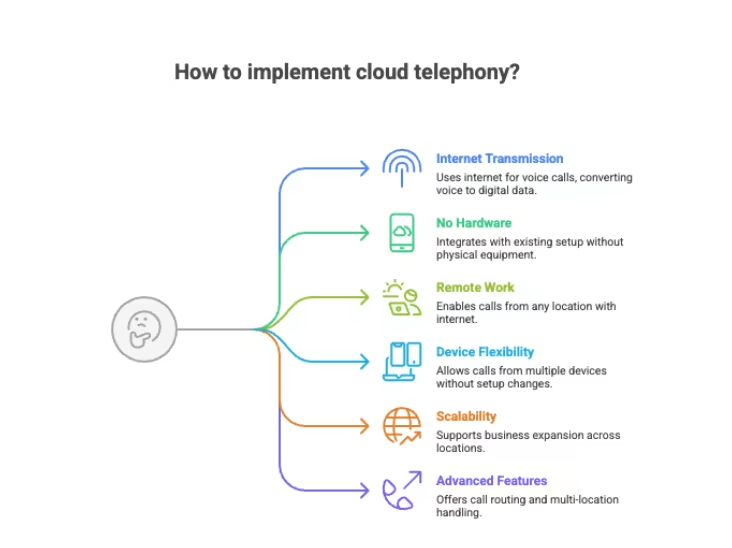
Calls Are Transmitted Over the Internet
Cloud telephony transmits voice calls over the internet rather than traditional phone lines. Your voice is converted into digital data and delivered instantly to the receiver.
No Physical Hardware Required
You can integrate cloud telephony services into your existing setup. There is no need for traditional equipment like PBX systems or desk phones. Everything runs online.
Work From Any Location
Since cloud telephony is not tied to a physical office, users can make and receive calls from anywhere. Calls can be taken using mobile phones, laptops, or tablets with an internet connection.
Use Any Device
Employees are not limited to one device. Cloud telephony allows calling from multiple devices without changing phone numbers or setups.
Scale Across Locations
Businesses can easily expand beyond local markets. Cloud telephony enables cost-effective operations across cities or countries without opening physical offices.
Advanced Call Management
Cloud telephony supports features like call routing, international call forwarding, and multi-location handling. Teams can make and receive calls simultaneously and route them to the appropriate location instantly.
Cloud Telephony Features
One reason cloud telephony is so popular is its wide range of features. These features make communication faster, smarter, and easier to manage. Here’s a beginner-friendly breakdown of the most important cloud telephony features.
Voice Over Internet Protocol (VoIP)
VoIP is the foundation of cloud telephony. It converts your voice into digital data and sends it over the internet. This is how cloud telephony works without traditional phone lines or hardware.
Unified Communications as a Service (UCaaS)
UCaaS brings calling, video meetings, messaging, and file sharing into one platform. Teams can work smoothly from any device, anywhere.
AI-Powered Virtual Assistants
AI assistants handle routine tasks like call routing, FAQs, and appointment booking. This improves efficiency and lets agents focus on important conversations.
Interactive Voice Response (IVR)
IVR uses menu options to guide callers to the right department. It reduces wait times and improves the customer experience.
Advanced Analytics
Cloud telephony provides call data, performance insights, and customer sentiment tracking. Businesses use this to improve results and ROI.
Omnichannel Communication
Calls, emails, chats, and social media messages one integrated into a single system. This creates a seamless customer experience.
Call Recording
Calls can be recorded for training, quality checks, and compliance. Recordings are stored securely.
Mobile and Video Integration
Agents can make calls, check voicemails, and join video meetings from mobile devices, keeping teams connected.
Smart Call Routing and CRM Integration
Calls are routed to the right agent based on rules and data. CRM integration shows caller history in real time for personalised support.
Security, Scalability, and Reliability
Cloud telephony encompasses encryption, flexible pricing, scalable deployment, and disaster recovery. Businesses can grow without concern for downtime or hardware limitations.
Cloud Telephony Advantages
Quick Setup and Easy to Use
Cloud telephony requires only an internet connection. There is no complex wiring or heavy setup. You can start using the system within hours instead of days. Teams can use existing devices, such as mobile phones or laptops.
No Infrastructure Hassles
Cloud telephony requires only an internet connection. There is no complex wiring or heavy setup. You can start using the system within hours instead of days. Teams can use existing devices, such as mobile phones or laptops. Businesses typically save 30-50% compared to traditional PBX systems by eliminating hardware purchases, installation fees, and ongoing maintenance costs.
Easy Integration With Existing Tools
Cloud telephony connects smoothly with CRMs, ERPs, and helpdesk tools. Agents can click to call directly from dashboards. This saves time and reduces manual work.
Flexible and Scalable
You can add or remove users instantly without downtime. Cloud telephony scales easily during peak seasons and scales down when demand reduces. No extra hardware investment is needed.
Enterprise-Level Communication for All Teams
Field staff, sales teams, delivery agents, and support teams can all use the same system. Calls are tracked and recorded, even when made from personal devices.
More Than Just Voice Calls
Cloud telephony supports SMS campaigns, missed-call solutions, and marketing tracking via virtual numbers. This helps measure performance across campaigns.
Better Productivity and Faster Responses
Automated follow-ups, smart call routing, and reminders help teams respond faster. This improves conversion rates and reduces missed opportunities.
Strong Security and Automatic Updates
Cloud telephony systems use encryption and compliance standards to protect data. Regular updates happen automatically, so the system never becomes outdated.
Potential Challenges of Cloud Telephony
While cloud telephony offers significant benefits, it’s important to consider a few potential challenges:
Internet Dependency – Cloud telephony requires a stable internet connection. Poor bandwidth or network outages can affect call quality or availability. Businesses should ensure reliable internet service and consider backup connections.
Call Quality Variability – VoIP call quality depends on network conditions. Jitter, latency, or packet loss can cause audio issues. Choosing a provider with quality-of-service (QoS) guarantees helps mitigate this.
Security and Compliance – Because calls travel over the internet, encryption and secure protocols are essential. Businesses in regulated industries (healthcare, finance) should verify that providers meet compliance standards like HIPAA or PCI-DSS.
Most reputable cloud telephony providers address these challenges through redundant infrastructure, encryption, and service-level agreements (SLAs).
Real-World Cloud Telephony Examples Across Industries
Cloud telephony is not limited to one type of business. It is used across industries to simplify communication and improve customer experience. Here are some easy-to-understand, real-world examples.
Sales and Customer Support
Sales teams use cloud telephony to call leads, automate follow-ups, and route calls to the right agent. Support teams handle high call volumes with IVR and smart routing, reducing wait times and improving resolution.
E-commerce and Retail
Online stores use cloud telephony to handle order confirmations, delivery updates, and customer inquiries. Virtual numbers help track marketing campaigns and understand which ads drive calls.
Healthcare
Clinics and hospitals use cloud telephony for appointment reminders, patient follow-ups, and helplines. Doctors and staff can take secure calls from multiple locations.
Logistics and Delivery
Delivery teams use cloud telephony to coordinate pickups, track shipments, and communicate with customers. Calls remain recorded and traceable even when made from mobile phones.
Education and EdTech
Institutions use cloud telephony for student inquiries, admissions support, and parent communication. Automated calls and messages save time during peak seasons.
Real Estate and Field Services
Agents use cloud telephony to manage property inquiries, schedule visits, and follow up with leads. Since calls work on mobile devices, teams stay connected on the move.
How Runo Fits Into Cloud Telephony and Call Management
Runo is not a replacement for cloud telephony-it is a unified call management platform that supports both SIM-based calling and cloud telephony , depending on how your team works.
To understand Runo’s value, it’s important first to clarify the difference.
SIM-Based Calling vs Cloud Telephony (Quick Context)
- Cloud telephony works fully over the internet and typically displays virtual landline numbers
- SIM-based calling uses real mobile numbers and works on GSM networks, with the internet required only for tracking and analytics
Runo brings both approaches into one single system, so businesses don’t have to choose one rigid setup.
When Teams Use Runo’s SIM-Based Calling
Runo’s SIM-based call management is ideal for sales and support teams that want:
- Higher call pickup rates
- Real mobile numbers displayed to customers
- Calling without internet dependency
- Simple mobile-first workflows
Calls are made directly from agents’ SIM cards, while Runo tracks, records, audits, and analyses every interaction through the app.
When Teams Use Runo’s Cloud Telephony
Runo also offers cloud telephony for teams that:
- Cannot use mobile phones on the floor (banks, NBFCs, insurance firms)
- Need laptop- or desktop-based calling
- Require scalable virtual numbers for large teams
Unlike traditional cloud telephony, Runo’s cloud calls can display virtual mobile numbers instead of landline-series numbers, helping maintain higher pickup rates even for internet-based calls.
Why Runo Feels Simple Despite Supporting Both
- No hardware or PBX setup
- Device-agnostic calling (mobile, laptop, or desktop)
- Built-in CRM for leads, calls, and follow-ups
- AI-powered call scoring and insights
- Real-time tracking and performance dashboards
- Smart follow-ups and automated reminders
- WhatsApp Business integration
- Fast onboarding with setup in ~30 minutes
Key Features That Make Runo Stand Out
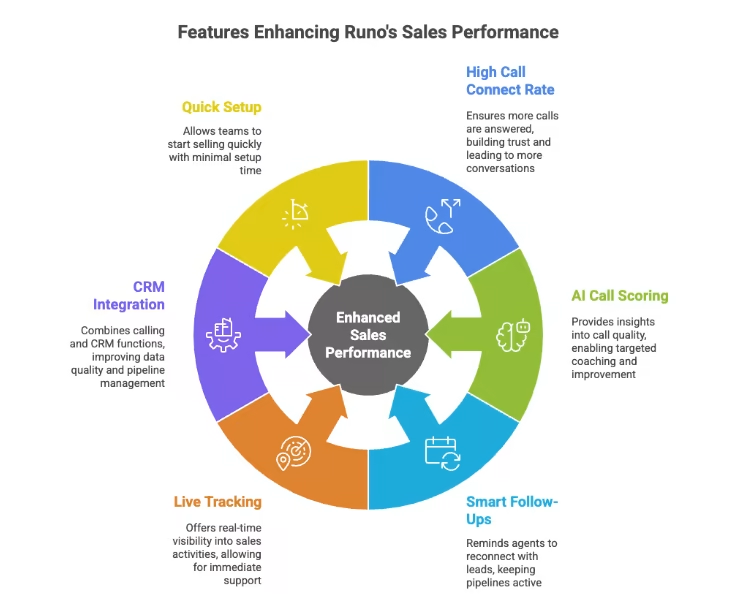
78% Call Connect Rate
With Runo, more calls actually get answered. Because it uses SIM-based calling over regular mobile networks, call drops are much lower. Prospects see real mobile numbers, not unknown virtual lines. This builds trust, improves pick-up rates, and leads to more real conversations. More connects mean more chances to close deals.
AI Call Scoring
Runo acts like a personal sales coach for your team. AI automatically analyses every call. It looks at tone, conversation flow, and outcomes. Managers get clear insights into what’s working and what needs improvement. This makes coaching faster, more focused, and easier to repeat at scale.
Smart Follow-Ups
Following up on time is critical, but easy to forget. Runo fixes that. It automatically reminds agents when to reconnect with leads based on past interactions. This keeps pipelines active and ensures no opportunity slips through the cracks. Your team stays consistent without manual tracking.
Live Tracking
Runo gives real-time visibility into calls, agent activity, and performance. Managers don’t need to wait for reports. They can spot issues early, support agents instantly, and keep momentum high throughout the day.
CRM Adoption Made Easy
Runo combines calling and CRM in one simple app. Agents naturally update notes, statuses, and follow-ups because everything happens in one place. This improves data quality and keeps the pipeline clean without extra effort.
30-Minute Setup
Getting started with Runo is fast. No hardware. No IT dependency. Just install, import contacts, and start calling. Teams can begin selling within minutes and focus on closing deals from day one.
FAQs
Is there any setup or installation fee for Runo?
No. Runo has zero installation cost and no hidden charges. You can complete the setup in under 30 minutes and start calling immediately without technical assistance or additional hardware requirements.
Can I try Runo before choosing a paid plan?
Yes. Runo offers a 10-day free trial on all plans. This allows teams to explore features, test call performance, and evaluate suitability before selecting a quarterly, half-yearly, or yearly subscription.
Are add-ons included in Runo’s base pricing plans?
No. Add-ons such as WhatsApp Business, AI Call Intelligence, guided onboarding, and extra storage are charged separately and can be added based on your business needs and usage preferences.
Is cloud telephony secure?
Yes, reputable cloud telephony providers use encryption (TLS/SRTP) to protect calls and data. Look for providers that comply with industry standards like SOC 2, HIPAA (for healthcare), and GDPR (for EU operations).
Can I keep my existing phone number with cloud telephony?
Yes, most cloud telephony providers support number porting, allowing you to transfer your existing business numbers to the cloud system without changing your contact information.