

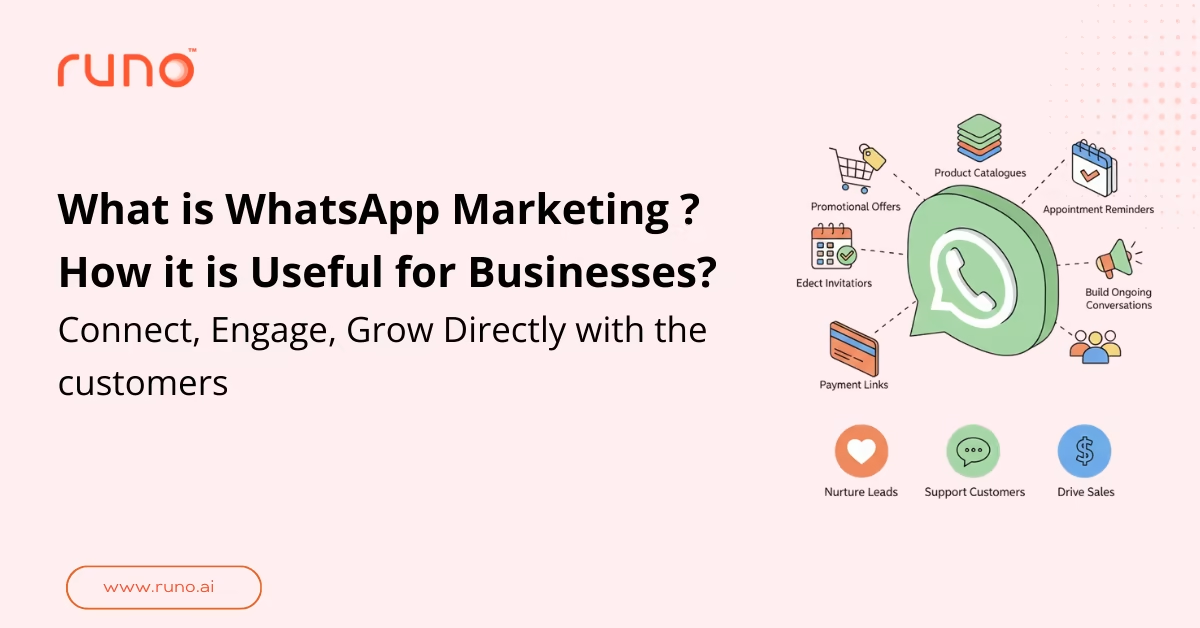
WhatsApp marketing is the use of WhatsApp as a direct communication channel to promote products, nurture leads, support customers, and drive sales. It allows businesses to send structured marketing messages, respond to inquiries, share updates, and build ongoing conversations with customers.
In simple terms, WhatsApp marketing is using WhatsApp to connect with customers in a more personal and immediate way than traditional channels like email or SMS. Businesses use it to send promotional offers, product catalogues, appointment reminders, payment links, event invitations, and follow-up messages.
Is WhatsApp Marketing Effective?
Yes. WhatsApp marketing delivers significantly higher engagement and ROI than traditional channels. Messages achieve a 98% open rate compared to email’s 20-25%, and response times average under 90 seconds. Businesses report 25-40% conversion rates on promotional campaigns, and customer acquisition costs are typically 30-50% lower than paid ads. Because WhatsApp is a trusted, personal channel, customers are more likely to read, respond, and act on messages making it one of the most cost-effective marketing tools available today.
Updated WhatsApp Usage & Engagement Stats
- WhatsApp has over 3.3 billion monthly active users globally in 2025.
- India alone has around 535.8 million WhatsApp users in 2025.
- WhatsApp messages enjoy an open rate of about 98% , similar to industry benchmarks.
- Over 200 million businesses use WhatsApp Business globally.
- 100 billion messages are sent on WhatsApp daily.
- Customers are 3× more likely to respond to a WhatsApp message than an email.
- Average WhatsApp response time is under 90 seconds, compared to 6–24 hours for email.
- WhatsApp marketing campaigns see 25–40% conversion rates on average.
- Businesses report 30–50% lower customer acquisition costs using WhatsApp vs. paid ads.
- 75% of consumers prefer messaging apps like WhatsApp over phone calls for customer service.
WhatsApp Business Platform Explained
The WhatsApp Business Platform is the official API solution for medium- and large-sized businesses that want to use WhatsApp at scale. Unlike the regular WhatsApp Business app, the platform allows companies to integrate WhatsApp directly with their CRM, marketing tools, sales systems, and support software.
Reach Customers Where They Already Are
WhatsApp has billions of users globally. The Business Platform allows companies to engage customers directly on WhatsApp without asking them to switch apps or channels. This makes communication faster and more convenient.
Two-Way Conversations Across the Customer Journey
The platform supports full two-way conversations. Businesses can run marketing campaigns, respond to inquiries, close sales, and provide post-purchase support within the same channel. This improves engagement across the entire funnel.
Rich and Interactive Messaging
Through the API, businesses can create interactive message flows. These include clickable call-to-action buttons, product catalogues, images, videos, quick replies, and structured menus. This makes conversations more dynamic and easier to navigate.
Common Use Cases of WhatsApp Business Platform
- Notifications: Businesses can send order confirmations, shipment updates, payment reminders, appointment confirmations, and other important alerts.
- Promotions: It enables personalised promotional messages, upsell and cross-sell campaigns, cart abandonment reminders, and targeted offers to maximise marketing ROI.
- Commerce: Customers can browse products, view catalogues, and place orders directly within WhatsApp, reducing friction in the buying process.
- Customer Support: Automated chat flows handle common queries, while complex issues are routed to live agents. The platform can also integrate with CRM and helpdesk systems. Here’s how you can choose the best WhatsApp CRM tool .
- Verifications: Businesses can use WhatsApp for one-time passwords and multi-factor authentication to secure accounts.
- Custom Conversational Flows: Companies can design unique conversational journeys tailored to their business goals.
Benefits of Full-Funnel WhatsApp Marketing Messages
Full-Funnel View at a Glance
| Funnel Stage | Objective | WhatsApp Message Type | Example |
| Awareness | Introduce brand | Product launch message | Discounted flight promotion |
| Consideration | Nurture leads | Catalogue or brochure share | Product comparison guide |
| Conversion | Drive purchase | Offer with CTA | 20% off + Shop Now link |
| Re-Engagement | Recover lost users | Cart reminder | “Complete your order” message |
| Loyalty | Retain customers | Personalized reward | Birthday discount offer |
WhatsApp marketing becomes powerful when used throughout the entire customer journey, not just for one-time promotions. A structured WhatsApp marketing strategy allows businesses to move customers from awareness to conversion and then to loyalty.
Below is how full-funnel WhatsApp marketing messages drive growth at each stage:
1. Build Awareness
At the top of the funnel, the goal is visibility. Once users opt in, businesses can introduce their brand, products, and services through personalised messages.
What you can do:
- Share new product launches
- Send service introductions
- Follow up on Click-to-WhatsApp ads
- Nurture early-stage leads
Example: A travel company runs a Facebook ad for discounted flights. When users click, they are redirected to WhatsApp. The business sends a personalised message with available routes, prices, and a “View Offers” button. This builds awareness and initiates conversation instantly.
2. Drive Sales
WhatsApp makes promotional messages more direct and actionable. Businesses can send offers with clear CTAs that reduce friction in the buying process.
What you can do:
- Announce limited-time discounts
- Share product recommendations
- Send price drop alerts
- Offer assisted selling via chat
Example: An e-commerce brand sends a message: “Your favourite sneakers are now 20% off. Shop Now.” The message includes a clickable product link. The customer taps, views the product, and completes the purchase within minutes.
3. Retarget and Re-Engage
Not all customers convert the first time. WhatsApp allows businesses to reconnect with dormant users or abandoned prospects.
What you can do:
- Recover abandoned carts
- Renew expired subscriptions
- Share loyalty rewards
- Upsell complementary products
Example: A SaaS company sends a message to a user who stopped using their trial: “We noticed you haven’t completed setup. Restart now and get 15% off your first month.” This reactivates the conversation and increases conversions.
4. Promote Your App
If your business has a mobile app, WhatsApp can drive installs and in-app actions.
What you can do:
- Share download links
- Offer app-exclusive discounts
- Encourage feature usage
Example: A food delivery brand sends: “Download our app and get ₹100 off your first order.” The message includes a direct install link, reducing barriers to action.
5. Build Loyalty and Long-Term Relationships
Beyond sales, WhatsApp helps strengthen relationships through personalised and timely communication.
What you can do:
- Send birthday offers
- Share helpful tips or updates
- Provide early access to new launches
Example: A beauty brand sends a personalised message: “Hi Ananya, your skincare refill is due. Here’s a 10% loyalty discount just for you.” This builds trust and repeat purchases.
Legal and Compliance Requirements for WhatsApp Marketing
Before launching WhatsApp campaigns, ensure full compliance with legal and platform requirements.
Explicit Opt-In is Mandatory
You can only send marketing messages to users who have explicitly opted in to receive communication from your business. Opt-in must be clear, specific, and documented. Pre-checked boxes and implied consent do not meet WhatsApp’s standards.
Common opt-in methods:
- Checkbox on website forms or checkout pages
- Click-to-WhatsApp ads with clear consent language
- QR codes with opt-in confirmation messages
- SMS or email invitations to join WhatsApp updates
Store opt-in records (timestamp, method, user ID) in your CRM for audit purposes.
Provide Easy Opt-Out
Every marketing message must include a clear way for users to opt out (e.g., ‘Reply STOP to unsubscribe’). Honor opt-out requests immediately and maintain a suppression list.
Follow Data Privacy Laws
Comply with GDPR (EU), CCPA (California), and other regional data protection regulations. Obtain consent for data collection, provide privacy notices, allow data access/deletion requests, and secure customer data.
Adhere to Meta’s Commerce and Business Policies
Meta prohibits:
- Sending messages without opt-in
- Misleading or deceptive content
- Promoting illegal products or services
- Excessive messaging frequency
Violations can result in account suspension or permanent bans.
Message Template Approval
All marketing message templates must be pre-approved by Meta before use. Templates are reviewed for policy compliance. Approval typically takes 24-48 hours. Rejected templates must be revised and resubmitted.
Maintain Compliance Records
Keep records of opt-ins, opt-outs, message logs, and template approvals. These are essential for audits and dispute resolution.
How to Start a WhatsApp Marketing Channel
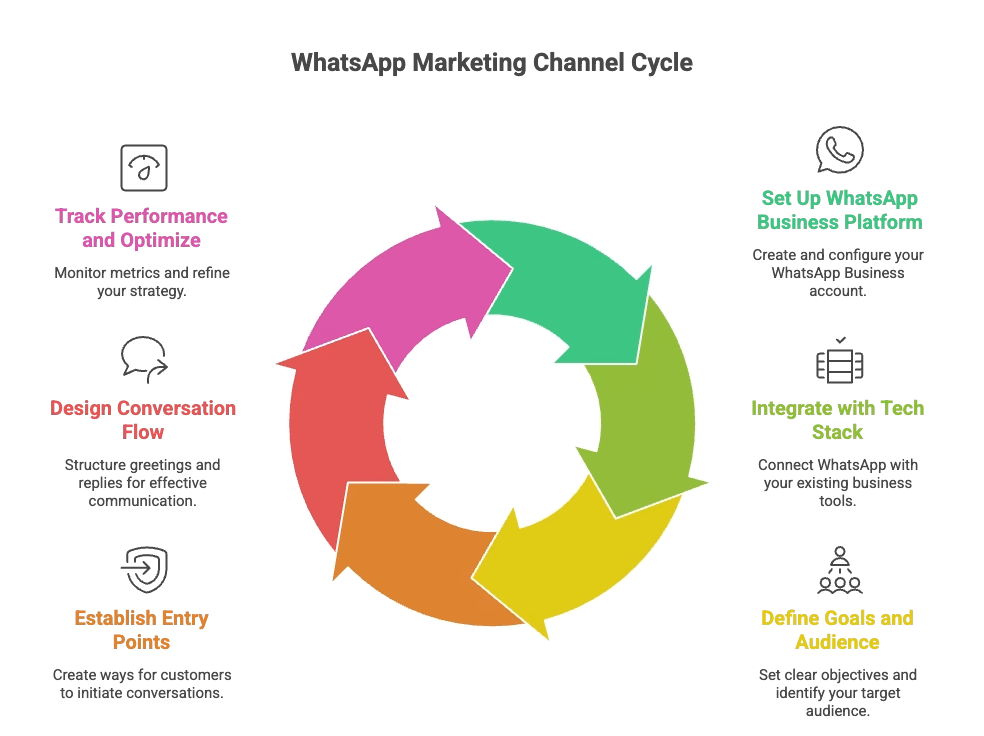
Starting a WhatsApp marketing channel requires proper setup, integration, and structured planning. Below is a simplified step-by-step approach.
Step 1: Set Up WhatsApp Business Platform
First, create a Meta Business Account. Then:
- Open Facebook Business Manager
- Go to Business Settings → WhatsApp Accounts
- Click “Add” → “Create a WhatsApp account”
- Enter business details such as account name, purpose, timezone, and currency
- Assign team members and permissions
Once completed, you can create message templates and monitor conversations directly from Business Manager.
Step 2: Integrate with Your Tech Stack
To run a scalable WhatsApp business marketing, integrate WhatsApp with:
- CRM systems
- Marketing automation tools
- POS systems
- Chatbots or conversational AI platforms
This allows you to send automated messages based on customer behavior such as abandoned carts or price drops. Here are the top benefits of WhatsApp CRM integration for small businesses .
Step 3: Define Campaign Goals and Audience
Decide what you want to achieve. Common goals include:
- Lead generation
- Sales conversion
- Customer nurturing
- Retention
Clearly define your audience before launching campaigns.
Step 4: Establish Entry Points
Customers need a way to start the conversation. Common entry points include:
- Click-to-WhatsApp ads
- Website chat buttons
- QR codes on packaging
- Social media posts
- Exit-intent popups
Step 5: Design Conversation Flow
Create a greeting message that starts automatically. Follow it with structured replies through agents or chatbots. Include clear opt-in requests for future messages.
Step 6: Track Performance and Optimise
Monitor metrics like:
- Leads generated
- Conversions
- Cost per lead
- Sales
- ROI
Run A/B tests on message variations and continuously improve your WhatsApp marketing strategy based on performance data.
WhatsApp Marketing Best Practices
To maximize results from your WhatsApp campaigns, follow these proven best practices:
1. Always Get Explicit Opt-In
Only message users who have explicitly agreed to receive communication from your business. Use clear opt-in language on forms, checkout pages, and ads. Store consent records in your CRM for compliance.
2. Segment Your Audience for Relevance
Don’t send the same message to everyone. Segment by behavior (purchase history, cart abandonment), demographics (location, age), and engagement level (active vs. dormant). Personalized messages see 3-5× higher response rates.
3. Keep Messages Concise and Actionable
WhatsApp users expect quick, clear communication. State your offer or message in the first sentence. Include one clear call-to-action button. Avoid long paragraphs.
4. Use Rich Media to Boost Engagement
Messages with images, videos, or PDFs get 40-60% more engagement than text-only messages. Use product photos, demo videos, brochures, and location pins where relevant.
5. Automate Responses for Speed
Set up automated greetings, away messages, and FAQ responses. Use chatbots to handle common queries instantly. Route complex issues to live agents.
6. Respect Timing and Frequency
Send messages during business hours in the recipient’s timezone. Avoid late nights and early mornings. Limit promotional messages to 2-4 per month to prevent opt-outs.
7. Test and Optimize Continuously
Run A/B tests on message copy, CTA buttons, send times, and media types. Track open rates, click-through rates, conversions, and opt-out rates. Refine based on data.
8. Comply with WhatsApp Policies and Local Laws
Follow Meta’s Commerce and Business Policies. Include opt-out instructions in every marketing message. Respect GDPR, CCPA, and local data privacy regulations.
How to Choose WhatsApp Marketing Software
Selecting the right WhatsApp marketing platform is critical for scalability and compliance. Evaluate providers using these criteria:
1. Official WhatsApp Business Solution Provider (BSP) Status
Only work with Meta-verified Business Solution Providers. Official BSPs ensure compliance, reliable message delivery, and access to the latest features. Check Meta’s partner directory.
2. Feature Set and Capabilities
Look for: broadcast messaging, contact segmentation, message templates, chatbot builder, live agent handoff, analytics dashboard, multimedia support, and API access. Ensure the platform supports your use cases (marketing, sales, support).
3. Ease of Use and Setup Time
The platform should have an intuitive interface that non-technical teams can use. Check onboarding time, template approval process, and learning curve. Request a demo.
4. Scalability and Messaging Limits
Confirm the platform can handle your current and projected message volume. Understand WhatsApp’s tiered messaging limits and how the provider helps you scale your quality rating.
5. Integration with Your Tech Stack
Ensure seamless integration with your CRM (Salesforce, HubSpot, Zoho), e-commerce platform (Shopify, WooCommerce), marketing automation tools, and helpdesk software. API and webhook support are essential.
6. Pricing Transparency
Understand the pricing model: per-message fees, platform subscription, setup costs, and any hidden charges. Compare total cost of ownership across providers. Factor in Meta’s conversation-based pricing.
7. Customer Support and Documentation
Look for providers offering dedicated account managers, 24/7 support, comprehensive documentation, and active user communities. Check reviews and response times.
How to Create and Send Marketing Messages

Once your WhatsApp Business Platform account is active, creating and sending marketing messages is a structured process. Below is a simplified breakdown.
Step 1: Get Started
Go to Shopping (Storefront) → Marketing Messages .
If this is your first campaign, tap Get Started . If you’ve used it before, you’ll see previous drafts. Tap the plus (+) icon to create a new message.
Step 2: Create Your Message Draft
Start by building your message draft. This includes adding media, text, and an action button.
Add Media
Every marketing message requires at least one image. You can add:
- An image from your device
- A product image from your catalogue
- A previously shared photo or video
- Archived status media
Media increases engagement and improves click-through rates.
Add Text and Personalisation
Tap “Add text” to write your message. You can personalise it using the customer’s name.
Example:
Hi {receiver name}, enjoy 10% off your next purchase. Use code SAVE10 today.
Personalisation improves response rates and makes WhatsApp marketing more effective.
Step 3: Add an Action Button
You can include one CTA button, such as:
- View Catalog
- Tap to Reply
- Phone Call
- Visit Website
Step 4: Preview and Submit for Review
Use the Preview option to see how your message will appear. All marketing messages are reviewed by Meta before they are sent.
Step 5: Select Audience
Choose recipients from your contact list or specific broadcast lists. You can select all contacts or pick specific ones.
Step 6: Review, Send, or Schedule
Review message content, audience, and pricing. You can:
- Tap Send to deliver immediately
- Tap Schedule to send later
Your device must be connected to the internet at the scheduled time.
Step 7: Add Payment Method
Before sending, add a payment method. You are charged only for successfully delivered messages. Funds are reserved initially and adjusted after delivery.
How Runo Enhances WhatsApp Business Marketing
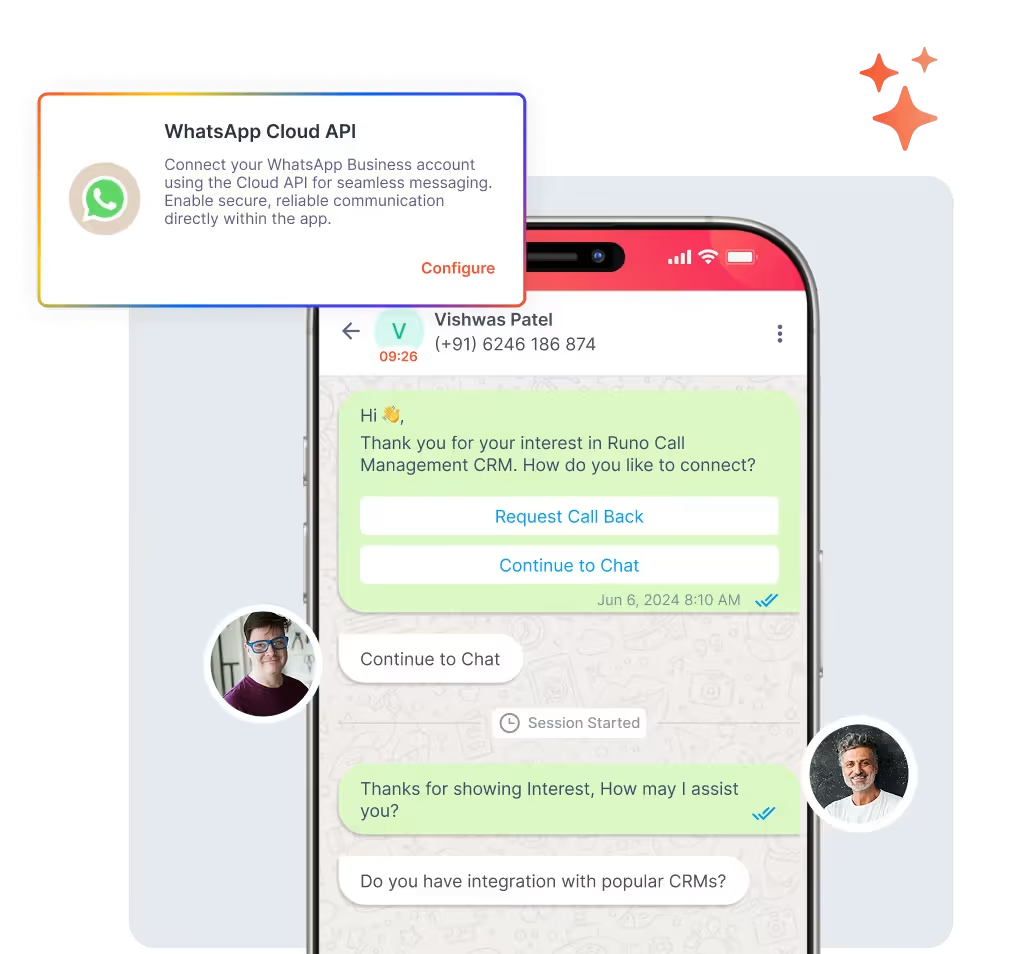
Running WhatsApp campaigns becomes more powerful when communication, tracking, and follow-ups are managed in one system. Runo integrates WhatsApp Business capabilities directly into its CRM, helping teams engage, track, and convert leads more efficiently.
With Runo , businesses can operate all WhatsApp campaigns from one centralised professional number. This creates consistency across marketing and sales communication while maintaining brand credibility.
Campaigns are not limited to plain text. Teams can send rich messages that include images, videos, PDFs, brochures, and even location pins. This is especially useful for industries such as real estate, education, and financial services, where visual context matters.
Runo also supports bulk messaging with personalisation. Businesses can segment audiences and send customised messages at scale instead of generic broadcasts.
One major advantage is the unified interaction timeline. WhatsApp chats, calls, emails, follow-up notes, and reminders are all tracked inside the same CRM view. This prevents lead leakage and improves accountability.
The unified inbox allows teams to manage all WhatsApp conversations within Runo CRM. Upcoming auto-replies and quick response features will further speed up engagement.
Finally, built-in analytics and reports help measure campaign performance through visual dashboards, making WhatsApp business marketing measurable and structured.
FAQs
What is the pricing for WhatsApp marketing messages?
With WhatsApp marketing messages, you pay only for messages successfully delivered within 5 days. Charges accumulate and are billed later, or deducted from prepaid funds. In India, WhatsApp marketing messages cost approximately ₹0.7846 per delivered message.
Can I send promotional messages to anyone on WhatsApp?
No. You can only send marketing messages to users who have opted in to receive communication from your business.
What happens if my marketing message gets rejected by Meta?
If a message template violates WhatsApp policies, Meta may reject it. You’ll need to edit the content and resubmit it for approval.
Is there a limit to how many marketing messages I can send?
Yes. Messaging limits depend on your WhatsApp Business account tier and quality rating, which increase as your engagement and compliance improve.