

Auto dialer software for a call centre has become a core part of modern customer communication. It removes the need for agents to dial numbers manually and allows them to connect with more customers in less time. When call centres handle hundreds or thousands of calls every day, even a small delay between calls can affect performance. That is why businesses are shifting from manual dialling to smart systems that automate outbound calls and improve productivity without increasing workload.
A good auto dialler does more than dial numbers. It detects whether someone has answered the call, routes connected calls to available agents, logs conversations, stores customer data, and supports follow-ups. It helps reduce idle time and boosts customer satisfaction.
The guide below explains how auto diallers work, the main features you should look for, and why they are essential for growing call centres.
What Is an Auto Dialer and How Does It Work?
An auto phone dialer software is a system that automatically dials numbers from a contact list or CRM. Auto dialer is one of the important features of any telecaller app . Instead of agents calling customers manually, the software does it for them and connects agents only when the call is answered.
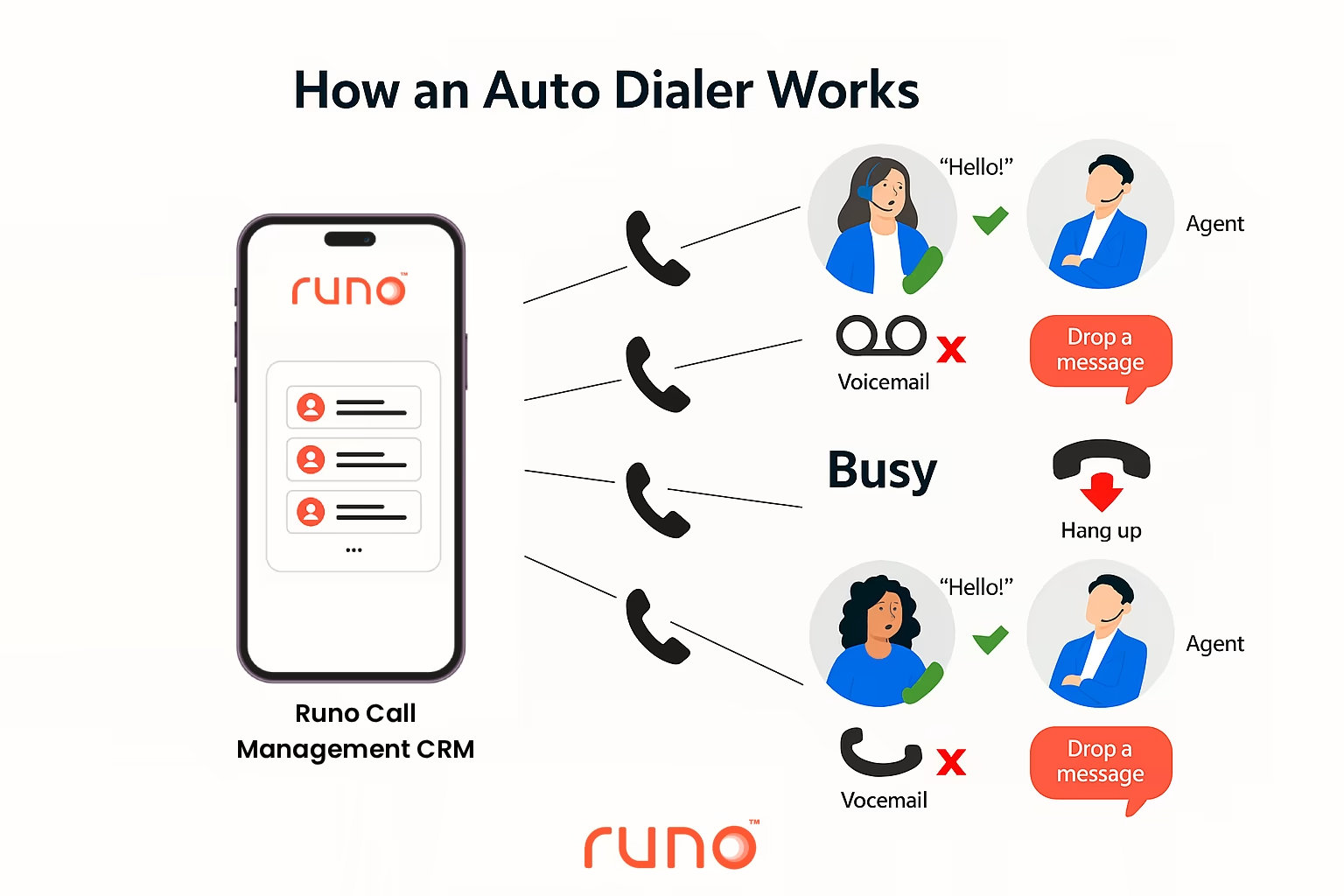
Here’s a simple explanation of how an auto dialer works :
- A list of leads or customers is uploaded or synced from CRM.
- The system begins dialling numbers based on a selected dialling strategy.
- It detects busy tones, call failures, switched-off numbers, and voicemail.
- If a person answers the call, it connects them to a free agent.
- All call logs, recordings, notes, and follow-up reminders are stored automatically.
This automation allows agents to spend more time speaking to customers instead of waiting for calls to connect.
Why Manual Dialling Slows Down Call Centres
Call centres that still rely on manual dialling face common issues:
- Agents dial numbers repeatedly throughout the day.
- High idle time between conversations.
- Low pickup and poor customer experience.
- Missed follow-ups due to a lack of reminders.
- Limited visibility of agent performance.
- Higher operational cost to manage call volume.
These problems affect both productivity and customer trust. It is where autodialers make an instant difference.

Types of Auto Phone Dialers
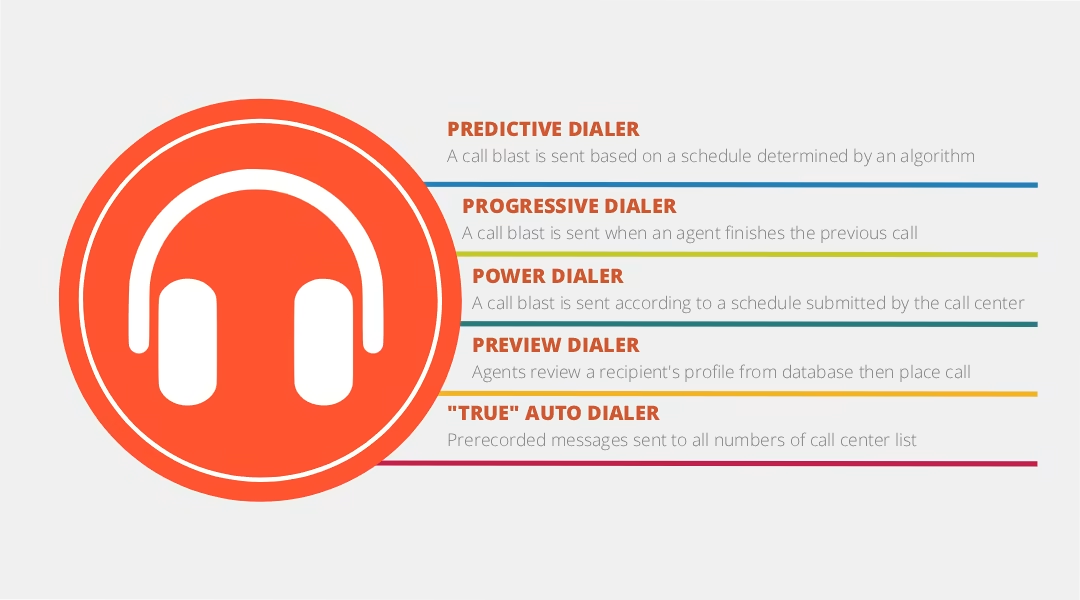
There are different types of auto phone dialers based on business needs:
1. Preview Dialer
The agent can see customer details before the call. Useful for high-value leads, premium support and sensitive cases.
2. Progressive Dialer
Dials the next number only when an agent finishes the previous call. Best for customer support and helpdesk teams.
3. Predictive Dialer
Uses AI to dial multiple numbers and predicts when an agent will be free. It helps maximise talk time and reduce idle time. Most fast-paced sales teams prefer systems with predictive dialer features .
The global market for predictive dialer software is estimated to be worth about USD 3.20 billion in 2024, and analysts believe it will expand rapidly with a projected CAGR of 42.3% between 2025 and 2030.
4. Power Dialer
Dials numbers continuously from the calling list and connects only answered calls to agents. Best for high-volume outbound campaigns.
Choosing the right dialler depends on the type of campaigns, number of agents and company goals.
Top Features of Auto Dialer Software for Call Centres
Below are the must-have features for powerful call centre auto dialer systems:
Smart Call Routing
Connects live calls to free agents instantly, so customers do not wait on the line.
Answering Machine Detection
Identifies if a person or voicemail answers the call and handles it accordingly.
Predictive Dialling
Uses AI to reduce idle time and ensure maximum talk time for agents.
Call Recording and Monitoring
Stores recordings for quality checks, compliance and training. Live call monitoring helps supervisors guide agents during calls.
CRM and Lead Source Integration
Syncs customer data from multiple platforms so agents receive full context before speaking.
Performance Dashboard and Analytics
Tracks agent call counts, call duration, success rate, missed follow-ups, and customer outcomes.
Automatic Follow-Up Reminders
Agents are alerted to callbacks and pending follow-ups, making sure no lead goes cold.
Benefits of Auto Dialer Software for Call Centres
Using auto dialer software for a call centre provides clear advantages compared to manual calling:
1. Higher Calling Productivity
Agents speak more and dial less. It alone can improve call output by 2x to 3x.
2. Increased Sales and Conversions
More conversations lead to more opportunities to sell, support and retain customers.
3. Fewer Missed Leads
Every customer is contacted at the right time with proper follow-up reminders.
4. Reduced Cost Per Call
Businesses achieve higher performance without hiring more agents or buying more resources.
5. Better Customer Experience
Customers do not wait long, calls are more relevant, and agents can personalise conversations using CRM data.
6. Full Transparency for Managers
Live dashboards show the performance of each agent and campaign in real time.
Difference Between Auto Dialer Software and CRM
Many teams ask, What is the difference between a dialer and a CRM? Well, the table below differentiates the key differences between auto dialer software and CRM in simple words:
| Area | Auto Dialer | CRM |
| Goal | Fast calling & automation | Customer relationship and data management |
| Core Function | Auto dialling & routing | Lead tracking, notes, nurturing |
| Best For | Telecalling, sales, support | Customer lifecycle |
| Works Best When | Integrated with a CRM | Integrated with a dialler |
For best results, companies usually use both systems together rather than separately.
Which Dialer Is Best for Call Centres?
There is no single answer to Which dialer is best for a call centre? Because it depends on the use case.
| Call Centre Type | Ideal Dialer |
| High-volume sales | Predictive dialer |
| Customer support | Progressive dialer |
| Finance, insurance, B2B | Preview dialer |
| Telemarketing | Power dialer |
The most important factor is choosing a system that grows with the business, supports CRM integration, and provides automation.
When Should a Call Centre Switch to Autodialers?
Switching to call centre dialler systems becomes urgent when:
- Agents struggle to reach daily call targets.
- Customers complain about late responses.
- Follow-ups are missed frequently.
- Manual dialling takes too much time.
- Managers cannot track call outcomes properly.
If even one of the above situations exists, moving to auto phone dialers can bring instant improvements.
How Runo Helps Call Centres Solve Calling Challenges
Many call centres upgrade to auto diallers but still struggle because most systems are difficult to use, need heavy setup or do not match real calling needs in the field. And this is where Runo brings a practical and simple approach.
| Common Call Centre Challenge | How Runo Helps |
| Low call pickup and poor customer reach | SIM-based calling boosts pickup rates and provides clear voice quality |
| Agents unable to meet daily call targets | 2x increase in calling productivity within weeks |
| Too many lead sources and no single view | Runo connects with multiple lead sources and top CRMs |
| Missed follow-ups and lost leads | Built-in reminders and call logs ensure no potential customer slips away |
| Low visibility of agent activity | Live dashboards and real-time supervision for managers |
| Adoption issues with complicated tools | Quick onboarding and a user-friendly mobile-first interface |
Why Call Centres Prefer Runo
- Reliable SIM-based calling that customers trust.
- Faster calling without manual dialling.
- Agents can call from anywhere with the same caller ID.
- Works smoothly with your current CRM and tools.
- Helps teams deliver a consistent customer experience.
Runo gives teams what they need most: more connected calls, more real conversations and better control over operations without forcing big changes in workflow.
Start with a 10-day free trial , no credit card needed.
Runo was awarded Global Indian MSME of the Year in Sales Tech and is currently trusted by 3500+ businesses.
Learn more at https://runo.ai .
Wrapping Up
The demand for auto dialer software for call center continues to grow because manual dialling slows teams down. Auto diallers remove idle time, automate follow-ups, improve customer satisfaction and give agents more time to focus on real conversations.
Whether you run a small calling team or a large support centre, using the right auto phone dialer software leads to quicker calls, higher conversions and better customer relationships. With technology like predictive dialling, CRM sync and real-time dashboards, call centres can achieve more with the same team.
Adopting an advanced call centre auto dialer is no longer optional. It is the foundation of a modern calling strategy that supports growth, productivity and customer trust.
To know more, explore Runo’s expert blog section.
FAQs: Auto Dialer Software for Call Centres
1. What is the purpose of auto dialer software for a call centre?
The purpose of auto dialer software for a call centre is to automatically dial phone numbers and connect only answered calls to agents. This reduces idle time, boosts productivity, and helps agents speak to more customers throughout the day.
2. How does auto dialer software for a call centre increase sales?
Auto dialer software for a call centre increases sales by speeding up outbound calling, reducing gaps between calls, and sending follow-up reminders so that no lead is missed. More conversations result in higher chances of conversion.
3. What is the difference between CRM and auto dialer software for a call centre?
A CRM stores customer information and tracks the entire customer journey, while auto dialer software for a call centre focuses on fast, automated calling and connecting agents with customers. Used together, they form a complete calling and customer management system.
4. Which dialer is best for call centre auto dialer needs?
The best dialer depends on the type of calls and campaigns. Predictive dialers work best for high-volume sales, preview dialers for finance and insurance, progressive dialers for support teams, and power dialers for telemarketing.
5. Why should small businesses use auto dialer software for a call centre?
Small businesses benefit from auto dialer software for a call centre because it helps them reach more customers with fewer resources. It reduces calling time, cuts missed follow-ups, and delivers a professional customer experience without requiring additional agents.