

CRM stands for Customer Relationship Management. In sales, it means managing all interactions with leads and customers in one organized system.
But many people still ask, what is CRM in sales exactly?
In simple terms, it is software that helps sales teams track conversations, follow-ups, deals, and customer history. Every call. Every email. Every message. Everything stays in one place.
So, what is a sales CRM system ? It’s a tool built specifically to help sales teams close more deals. It records sales calls, meeting notes, pipeline stages, reminders, and customer details. No more sticky notes. No more messy spreadsheets.
When someone searches for what is CRM in sales , they usually want to know how it helps in daily work. Here’s how:
- Tracks every customer interaction
- Stores contact information
- Manages deal progress
- Sets follow-up reminders
- Improves team coordination
A sales CRM system also connects data from marketing, customer support, and digital platforms. Some advanced tools even use AI to suggest next steps or prioritize leads.
What Is a Sales CRM System?
A sales CRM system is a tool that helps businesses manage leads, track conversations, and close deals in a structured way.
At its basic level, a CRM stores customer information. Names. Phone numbers. Email IDs. But that’s just the starting point.
A proper sales CRM tracks every interaction. Calls. Messages. Meetings. Follow-ups. It keeps everything in one place, so nothing gets missed.
Sales teams use a CRM to manage leads, track deal stages, and monitor conversion rates. Instead of guessing who to call next, they see it clearly in their pipeline.
Service teams use it to manage support requests and customer queries. Marketing teams use it to run campaigns and track responses. Managers use it to monitor performance and forecast revenue.
Most modern CRMs are cloud-based. That means teams can access data from anywhere, office, home, or field.
In simple terms, a sales CRM brings structure to customer communication. It replaces scattered spreadsheets with a system that helps teams work faster and follow up better.
Because in sales, missing a follow-up often means missing revenue.
Why CRM Is Critical in Modern Sales
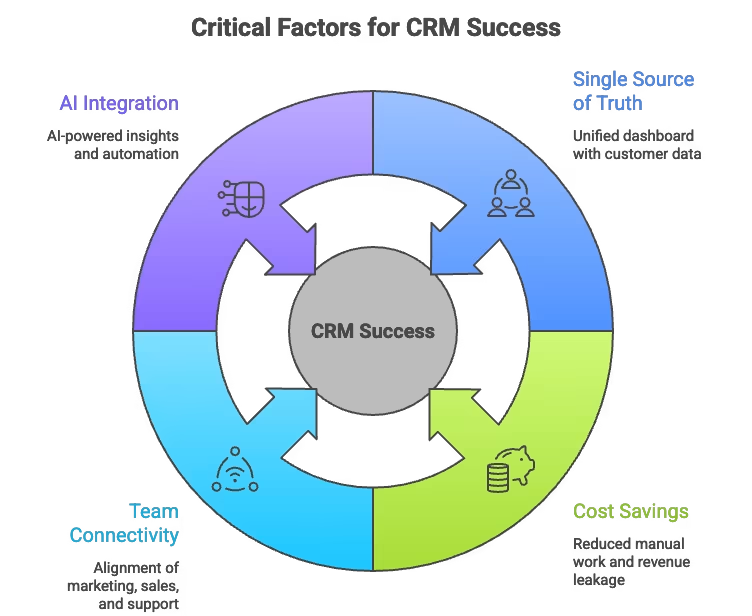
A Single Source of Truth
A CRM provides one unified dashboard.
- Customer details.
- Purchase history.
- Call records.
- Open support tickets.
- Follow-ups.
Everything in one place.
Customers today expect context. Nearly 71% expect the representative they speak to to know their history already. Without a CRM, that level of coordination is difficult.
The business case is equally strong: CRM software delivers $3.10 for every dollar spent (Nucleus Research), and 91% of businesses with 11+ employees now use a CRM. In India, the CRM market is projected to grow at 12.1% CAGR through 2030, driven by digital transformation in SMEs.
Customers today expect context. Nearly 71% expect the representative they speak to to know their history already. Without a CRM, that level of coordination is difficult.
When sales, marketing, and service teams access the same data, conversations flow more smoothly. No repetition. No confusion.
Cost Savings and Operational Control
Sales teams generate a lot of information daily. Calls. Meetings. Notes. Objections. Follow-up commitments. If this data remains in notebooks, personal devices, or memory, it poses a risk.
Leads get ignored. Follow-ups are delayed. Managers cannot measure performance accurately.
If a salesperson leaves and their information isn’t stored centrally, the business loses more than an employee. It may lose the pipeline.
Using a CRM reduces manual tracking and administrative work. It frees up time for actual selling.
That’s one reason companies start searching for the best CRM for sales, not just to store contacts, but to prevent revenue leakage.
Connecting All Teams
A CRM is not only for sales.
- Marketing teams use it to track campaign responses and lead journeys.
- Sales teams use it to move deals through stages.
- Customer support uses it to see past interactions before responding.
- Commerce teams use purchase data to personalise offers.
Instead of departments operating independently, a CRM aligns them around the customer.
Increasing Productivity with AI
Modern CRMs now combine structure with AI. AI can summarise calls, draft emails, predict deal closure probability, and forecast quarterly sales numbers. Instead of manually analysing data, teams get faster insights.
AI-powered CRMs help managers make better predictions and help agents personalise conversations without spending hours preparing.
Key Features of a Sales CRM System
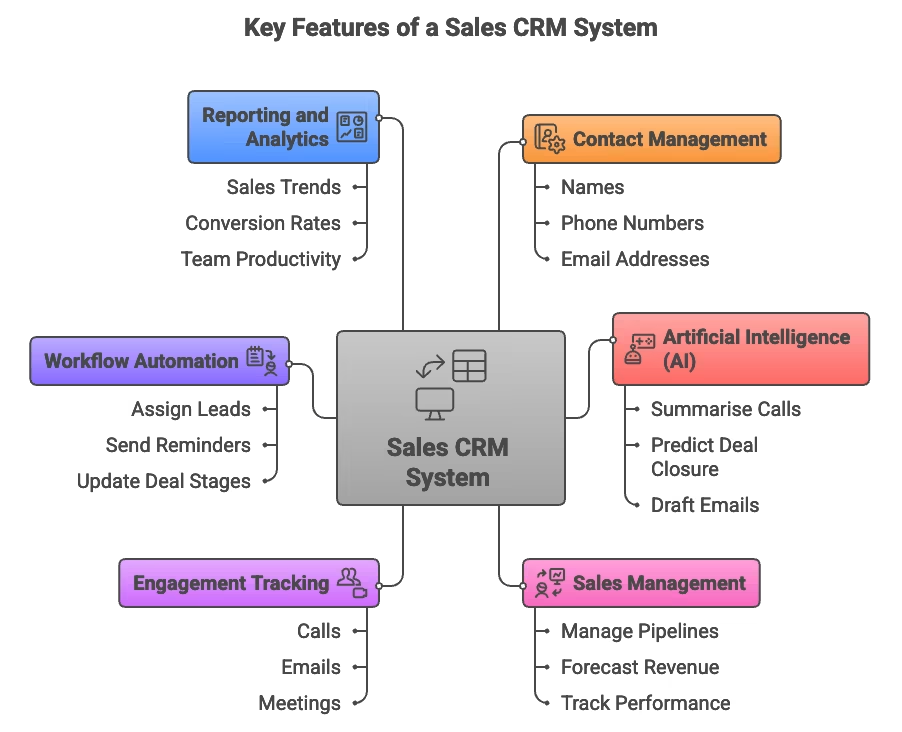
A sales CRM system comes with features that help businesses manage leads, conversations, and performance in a structured way. Here are the core ones that matter.
Contact Management
Contact management allows businesses to store all customer information in one place. This includes names, phone numbers, email addresses, company details, and even social profiles. Instead of scattered spreadsheets or personal notes, everything is stored in a central database. This makes it easier for sales, marketing, and support teams to access the same information and communicate better with customers.
Artificial Intelligence (AI)
AI in a CRM helps teams work faster and smarter. It can summarise calls, suggest follow-ups, predict the likelihood of deal closure, and automate repetitive tasks. With generative AI, sales emails or responses can be drafted in seconds. Instead of manually analysing data, teams get insights instantly, which improves decision-making and productivity.
Sales Management
Sales pipeline management tools help track the entire sales process, from lead generation to deal closure. Teams can manage pipelines, move opportunities through stages, and forecast revenue. This keeps sales organised and prevents deals from getting stuck. Managers also get visibility into performance and conversion rates.
Engagement Tracking
A CRM records every interaction with a customer. Calls, emails, meetings, notes, everything is logged. This gives teams a full view of the customer journey. It helps salespeople understand past conversations and personalise future interactions, rather than starting from scratch each time.
Workflow Automation
Workflow automation reduces manual work. Tasks such as assigning leads, sending follow-up reminders, updating deal stages, or triggering notifications can be automated. This reduces errors and ensures important actions are not delayed. Teams spend less time managing processes and more time selling.
Reporting and Analytics
A good CRM provides dashboards and reports that show sales trends, call performance, lead conversion rates, and team productivity. These insights help businesses make better strategic decisions. Instead of guessing what is working, managers can rely on real data to adjust campaigns and targets.
Types of CRM Systems Used in Sales
Not all CRM systems are built the same way. Depending on business goals, companies usually use one of three main types.
Operational CRM
An operational CRM focuses on daily sales activities.
It helps teams manage leads, automate follow-ups, track deals, and handle customer interactions in a structured way. Marketing campaigns, sales calls, and support requests can all be managed from one system.
The goal here is simple: reduce manual work and improve efficiency. From first contact to final conversion, everything is organised. This type of CRM is commonly used by sales-driven businesses that want better control over pipelines and follow-ups.
Analytical CRM
An analytical CRM focuses on data.
It collects information from calls, emails, campaigns, and customer behaviour, then turns that data into insights. Businesses use it to understand buying patterns, customer preferences, and performance trends.
Instead of just storing data, this system helps managers make smarter decisions. Forecasting sales, identifying high-value customers, and planning marketing strategies become easier when backed by real numbers.
Collaborative CRM
A collaborative CRM focuses on communication.
It connects teams, departments, partners, and sometimes even suppliers by sharing customer information across systems. Everyone works with the same data.
This ensures consistency. Sales knows what support was discussed. Marketing knows what sales closed. Customers don’t have to repeat information every time they interact with the company.
The result is smoother coordination and a more unified customer experience.
How to Choose the Best CRM for Sales Teams
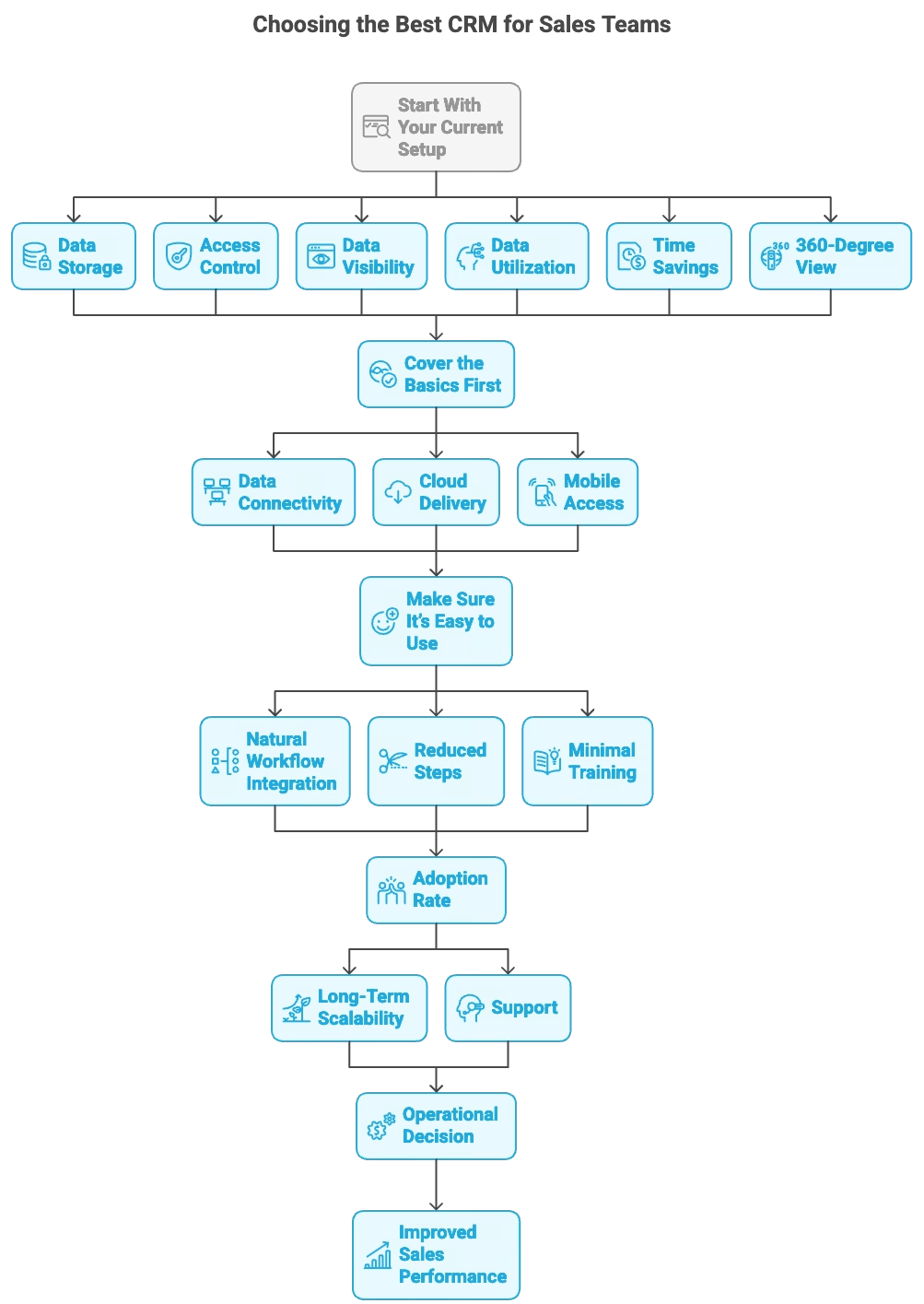
Choosing the best CRM for sales teams does not start with features. It starts with clarity. Before looking at demos or pricing pages, understand what your business actually needs.
Start With Your Current Setup
Ask yourself simple but important questions.
Where is your customer data stored right now?
Is it in spreadsheets, emails, or scattered tools?
Who has access to it?
Do you have proper controls to maintain privacy and compliance?
Can sales, marketing, and support teams see the same information?
Are you using your existing data properly, or is it just sitting there?
How much time do your employees spend on manual updates, repetitive entries, or chasing follow-ups?
And most importantly, do you truly have a 360-degree view of your customers?
The best CRM for sales is not the one with the most features. It is the one that fixes your current gaps.
Cover the Basics First
Every strong sales CRM should meet a few non-negotiable standards.
Data connectivity is critical. Your CRM should connect with your lead sources, calling systems, marketing tools, and other business processes. Data should not stay isolated.
Cloud delivery is equally important. A cloud-based CRM reduces IT burden, keeps software updated automatically, and strengthens security compared to manual setups.
Mobile access matters more than ever. Sales teams work from offices, homes, and the field. Your CRM should work on any device without limiting productivity.
Make Sure It’s Easy to Use
A complicated CRM becomes unused software.
It should fit naturally into daily workflows. Salespeople should not feel like they are doing extra work just to update the system.
Check whether it integrates smoothly into your team’s routine. See if it reduces steps instead of adding them. Understand how much training is required.
If your team struggles to use it, adoption drops. And without adoption, even the best CRM for sales delivers poor results. Finally, think long-term.
- Will the system grow with your business?
- Can it scale as your team expands?
- Does it offer support when your needs change?
Choosing a CRM is not just a software decision. It is an operational decision that directly affects sales performance.
CRM Implementation Best Practices
Choosing the right CRM is only half the battle. Successful implementation determines whether your team actually uses it. Here’s how to roll out a CRM without chaos.
1. Clean Your Data Before Migration
Don’t import messy spreadsheets directly into your CRM.
- Remove duplicate contacts
- Standardize phone number formats (+91 prefix for India)
- Fill missing fields (company name, lead source)
- Archive inactive leads from 2+ years ago
Clean data = faster adoption. Reps trust the system when contact info is accurate.
2. Start with a Pilot Team
Don’t roll out to 100 users on day one.
- Pick 5 – 10 early adopters (your best reps or most tech-savvy team members)
- Run the pilot for 2 – 4 weeks
- Collect feedback on workflows, missing fields, and pain points
- Refine before company-wide launch
Pilot teams catch issues early and become internal champions who train others.
3. Customize Workflows to Match Your Sales Process
Out-of-the-box CRM stages (Lead → Qualified → Proposal → Closed) rarely match reality.
- Map your actual sales stages (e.g., ‘Demo Scheduled’, ‘Pilot Running’, ‘Contract Sent’)
- Set required fields for each stage (e.g., can’t move to ‘Proposal’ without a budget)
- Automate repetitive tasks (e.g., send follow-up email 2 days after demo)
The CRM should fit your process, not force you to change how you sell.
4. Train Users in Small Groups
Hour-long all-hands training sessions don’t work.
- Run 30-minute role-specific sessions (SDRs, AEs, managers)
- Use real data and scenarios from your business
- Record sessions for new hires
- Offer drop-in office hours for questions
Hands-on training beats slide decks every time.
5. Track Adoption Metrics
You can’t improve what you don’t measure.
- Login rate: Are reps logging in daily?
- Data entry compliance: Are calls, emails, and notes being logged?
- Pipeline accuracy: Do deal stages reflect reality?
- Time to first value: How long until reps see a benefit (e.g., faster follow-ups, better reporting)?
If adoption is low after 4 weeks, revisit training and workflows.
6. Iterate Based on Feedback
No CRM is perfect on day one.
- Hold weekly feedback sessions during the first month
- Add custom fields or stages as needed
- Remove unused features to reduce clutter
- Celebrate wins (e.g., ‘We closed 3 deals this week thanks to automated follow-ups!’)
Continuous improvement keeps the CRM aligned with how your team actually works.
How Runo Enhances Sales CRM Performance
A CRM is only useful if your team actually uses it.
In many companies, the CRM sits separately from the calling system. Agents make calls from their phones. Later, they update notes manually. Sometimes they forget. Sometimes they delay. That gap reduces accuracy.
Runo reduces that gap.
It connects calling and CRM in one workflow. When an agent makes a call through the app, the system automatically logs the interaction. Call duration, recordings, notes, and follow-ups are stored instantly in the timeline. There is no separate data entry process.
This improves CRM hygiene without forcing extra effort.
Runo also strengthens visibility. Managers can see which agents are active, how many calls are made, average talk time, and lead conversion rates. Instead of reviewing end-of-day reports, performance can be tracked continuously.
For teams that rely heavily on outbound sales, this matters. Follow-ups are automated. Leads are assigned systematically. Missed calls can be tracked. WhatsApp or SMS messages can be sent immediately after conversations.
As operations grow, Runo supports both SIM-based and cloud calling within the same system. That means businesses can scale without migrating their CRM or losing historical data.
The result is simple.
- Less manual work.
- Better follow-ups.
- Clearer performance tracking.
- Higher accountability.
A CRM should not just store data. It should improve how sales teams operate every day.
FAQs
Can a sales CRM improve call pickup rates?
A CRM alone doesn’t improve pickup rates. However, when integrated with the right calling infrastructure, such as SIM-based or mobile-series virtual numbers, it can indirectly improve connection rates by combining structured tracking with better caller identification.
How long does it take to implement a sales CRM?
Implementation time depends on complexity. Basic setups can go live within hours, while larger enterprises may require integrations, data migration, and workflow configuration.
Can a CRM work for both field sales and inside sales teams?
Yes. Modern CRMs support mobile access for field teams and desktop dashboards for inside sales , ensuring both operate within the same system.
How do CRM analytics help in forecasting revenue?
CRM analytics track pipeline stages, historical conversions, and deal velocity. This data helps managers estimate future revenue based on real performance trends rather than assumptions.